Technical details
TODO:
- Cursor
- Reference date time
The business rule engine (BRE) is a component that brings decision making to the user while still having most of the process orchestrated by Vertex.
Technical details
There are a few technical details that can help in understanding how the BRE works:
Data context members (DSC)
The Rule Context can house many different kind of Data Context Members (DCM). These DCMs contain a type for strongly typed values, the value itself and a reference to how the value was created using a DataSourceDescription (DSD). The types of data context members supported are:
- BooleanDataContextMember
- CollectionDataContextMember
- ConsequenceDataContextMember
- CursorDataContextMember
- CustomEnumDataContextMember
- DateTimeDataContextMember
- ErrorDataContextMember
- NumericDataContextMember
- ManualDataContextMember
- ObjectDataContextMember
- StringDataContextMember
- VoidDataContextMember
- PeriodDataContextMember
- TimeSeriesSelectorDataContextMember
- TimeSeriesVectorDataContextMember
Data Source Description (DSD)
The data source description are used to track where a result is created from. If a result is provided by a input context that value will have a trace back to the entity that contains that value. If the value was read from a decision table the data source description will have a reference to the decision table version id. And if the value was created by calculating multiple values together it will be marked as a calculated value and the inputs of that calculation will be added as parents to that new DSD of type calculated. This way we can trace the origin of any value back to its source.
Lexer, Parser and finally an operation tree
The BRE scripting language is created as a grammar that processed into a operation tree. This operation tree is a stateless set of operations that can mutate the state of an Rules Context provided to the operation tree. Because the tree is stateless it is possible to keep the entire operation tree in memory and use it do high performance calculations on the operation tree without the need to interpret the BRE scripts again.
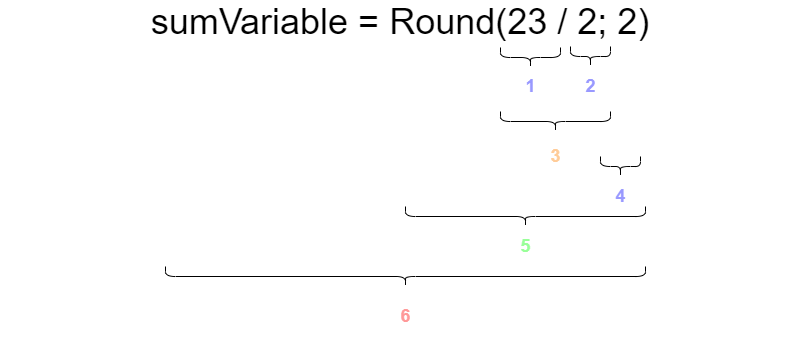
- Operation that creates a constant ouput of the decimal ‘23’
- Operation that creates a constant output of the decimal ‘2’
- A native operand to divide the output of operation 1. by the ouput of operation 2.
- Operation that creates a constant output of the decimal ‘2’
- A call to the method operation for the method ‘Round’, with as first parameter the output of operation 3. and as second parameter the output of operation 4.
- A native operand that assigns the operation after the ‘=’ sign to the locals dictionary of the Rules Context locals, with the ‘sumVariable’ string as the key and the output of operation 5. as the value
The operations are stateless and they will either provide a intermediate result that is consumed as input for other operations or they can interact with the Rules Context to alter the state of one or more of the channels.
Operation round-trip fidelity rule
An operation tree can be rendered back to a script (Operation.ToString with FormattingTypes.Script, exposed as RulesEvaluator.ReformatScript). This round-trip MUST preserve the meaning of the script exactly:
- The regenerated script must parse cleanly and evaluate to the same result as the original.
- Every construct, argument and operator must survive the round-trip. A dropped argument (for example a
WHILEiteration bound) is a defect, not a formatting difference. - Only whitespace and redundant parentheses may differ between the original and the regenerated script.
- Comments are lexer trivia and are not part of the operation tree, so the operation round-trip does not carry them. Any user-facing feature that regenerates a script a user wrote must therefore work from the token stream (which contains the comments) instead of the operation tree.
The rule is enforced per script case in EE.Library.UnitTests\Rules\ScriptCases: every case records what the round-trip currently produces, the regenerated form must stay parseable, and for cases with a recorded result the regenerated form must evaluate to that same result. Known violations are tracked as an explicit, shrinking list next to those tests and are defects to fix, not accepted behavior.
Rules Context
The Rules Context will act as the state store for a specific run of the BRE. The Operations Tree that performs the calculation is stateless itself, all it does is change the state of the Rules Context object. The object is devided into 5 channels, each channel consists of a dictionary that can be interacted with the help of the operations.
The local channel
This channel is used for intermediate results that help with scripting over multiple lines. With a simple assign in script parameterName1 = 1 the decimal data context member with a value of ‘1’ can be entered into the local channel under the key ‘parameterName1’. When the script later want to use the ‘parameterName1’ variable it can simple do so by referencing its variable name. parameterName1 + 1 will retrieve the value of ‘parameterName1’ from the local channel and make the value availble to the addition operand so it can add 1 to the stored value.
The data that is stored in the locals is only relevant during the run of the BRE script and will not be communicated to the caller of the script, its data will be deleted after the Rules Context is no longer needed.
The output channel
The output channel is comparable to the local channel, except that this channel is used as the explicit output of the script and returned to the caller that started the BRE calculation. To assign data to the output channel the <- assign command is used instead of the = that we use for the locals. This means that outputVariable <- 3 will assign the decimal data context member to the output channel under the provided ‘outputVariable’ name. This means that the output of the script will also contain the ‘outputVariable’, with its value 3. Values of the output channel can also be used in script to read back from the output channel, so we can do outputVariable - 2 to calculate a value of 1.
The input channel
The intput channel is provided at the beginning of the script and is provided as a initial value inside de Rules Context. These values can be read from, but they cannot be altered as there is no way to write into the input channel. The input in the input channel is normally provided by the caller of the BRE script run and is tuned to the context in which the BRE script is running. Examples of a input context could be a Pricing Request, a Pricing, a deal or an order.
The sideload channel
The sideload channel is a special channel that can override specific assignments to the output channel. The values that are availible in the sideload channel will replace the output of a output assign value to the value of provided by the sideload channel at the moment it is assigning it to the output channel. This is used to feed manually provided values back into the script and to alter intermediate variable as well.
This means that is we prepare the sideload channel with a value of ’thisValueMightBeOverwritten’ with a value of 5, the followin script thisValueMightBeOverwritten <- 3 will be intercepted by the sideload channel. This means that the result stored in the output channel will be the sideloaded value of 5, and this also means that if we use the ’thisValueMightBeOverwritten’ in a later part of the script it will also be returned as a 5. Ultimately rendering the following script thisValueMightBeOverwritten + 1 to return 6, instead of the 4 that we would have expected would there be no sideload value for ’thisValueMightBeOverwritten’.
The back channel
This channel is used by methods to exchange metadata with each other. Rather then having the user do all the heaving lifting by having to add a lot of metadata to the outputs the back channel can be used to add implicit metadata from one method to the other. The back channel is divided in a number of sections. The currently active section can be changed by calling a ‘ChangeSection’ operation, but this method is normally not called by a user in a normal script. This operation is injected by the system when we create a large operation tree from a mix of scripts and system configuration. By changing selections in our generated code we can easily provide metadata to that section. This makes it easy to collect data like decision tables that are used and the current pricing product element that is being calcualated. This enables us to have all the delecate moving pieces out of sight of the user and have the user just focus on the business decisions that need to be implemented. Besides the flow of metadata the back channel also enables the logging method that can collect all logs without the user having to explicitly collect the logs for the BRE run.
Diagnostics tips
There are a few tips that can help when debugging a script issue:
- Use the script provider for decision trees to view the generated script to resolve a decision table
- Use the ToOperationTree method to get a annotated string that shows the operations that are defined by a single linke of script provided to the method
Method Provider plugins
TODO