Software Build & Delivery
Deployment overview
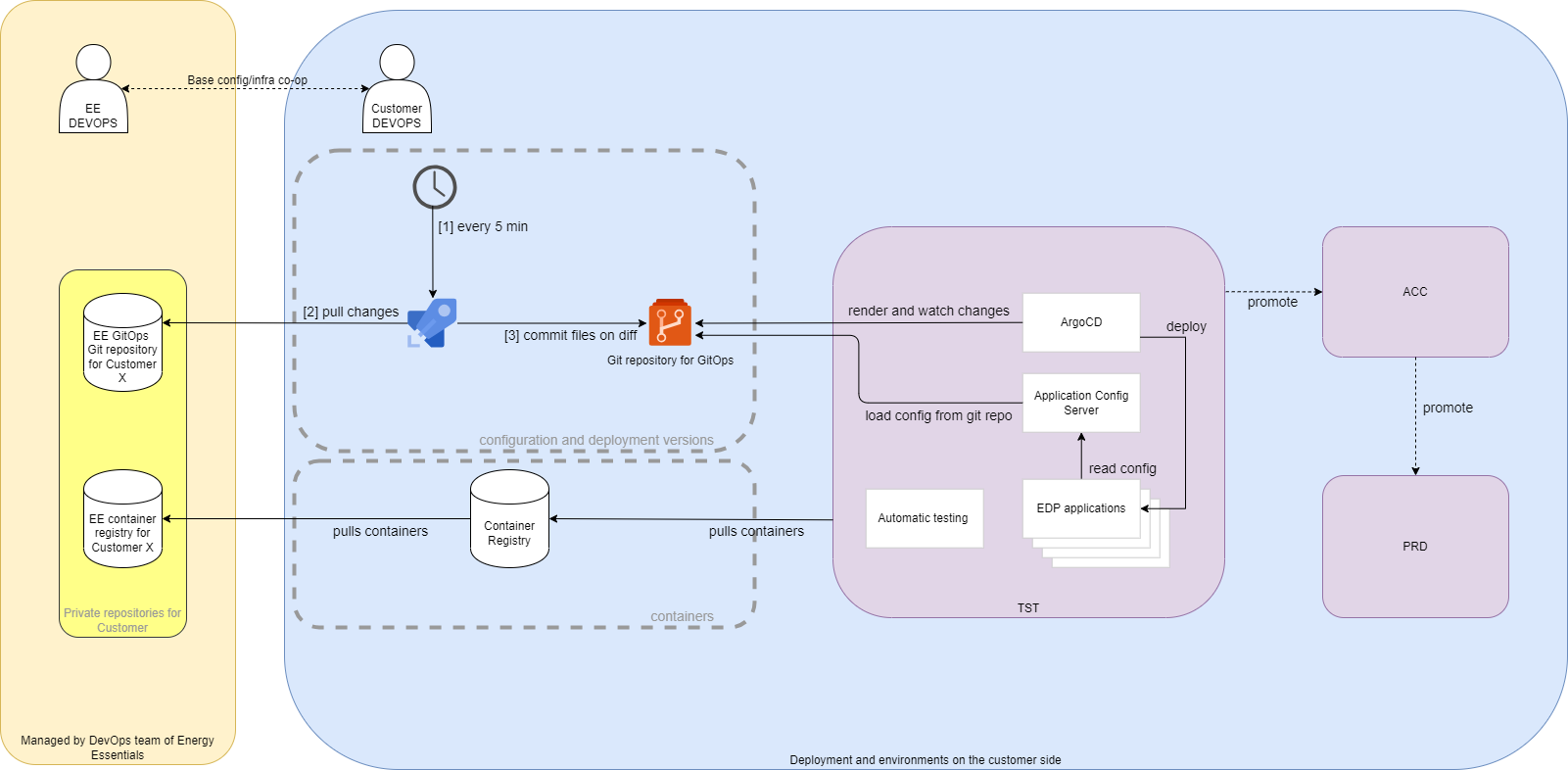
ArgoCD
Argo CD is a Kubernetes controller, responsible for continuously monitoring all running applications and comparing their live state to the desired state specified in the Git repository. Process Overview
Sync waves
To streamline the deployment of the full Vertex application we have implemented sync waves. This orchestrates the order in which resources are applied by ArgoCD. We have the following waves:
Wave -40: Operators
This will deploy all operators that will handle custom resources that are deployed later
Wave -30: Observability & Configuration
This will deploy all observability elements and the configuration service
Wave -20: Infrastructure services
This will deploy all shared commodity services like Kafka and Redis
Wave -10: Initialization & Upgrade jobs
Run the jobs that will initialize or upgrade the application components
No wave: The Vertex Components
Deploy the actual Vertex components that have a dependency on all previous waves
Container registry
Docker container images are delivered through a container registry. This is an repository that is specially designed for delivering images. The container register is contains various versions of the software containers. The container registry is customer specific and contains all the images that are used in the customer environment.
Git repository
GitOps is a way of implementing Continuous Deployment for cloud native applications. GitOps works by using Git as a single source of truth for declarative infrastructure and applications. An automated process synchronizes state between version control and the runtime environment.
There are roughly three steps to make this happen:
- Terraform to deploy the infrastructure on Azure including Azure resources like the Azure Kubernetes Service, Key Vaults, Storage Accounts and the Azure 2Container Registry. This step, including authorization, is automated using Azure Pipelines.
- Manual deployment of Argo CD (which is discussed separately in next section), with a Helmfile plugin for the final rendering of the Helm chart values. With Helmfile we can keep chart value files and maintain changes in version control. It allows layering as well.
- An Argo CD Application which enables the GitOps pipeline. From here on out continuous deployment takes place.
NB: Step 2 and 3 can (and will) be scripted with Terraform as well.
Release cycle
We have a bi-weekly sprint after which we always have a new release available. By using continuous integration we integrate the code of the developers frequently and minimize diverging paths of code. Running the automated tests will continuously check thousands of assumptions we have over our technical functionality and will catch code that alters one of those assumptions early in the process. Frequent releases to production makes sure that the amount of change per release is smaller and therefor the risk smaller. In the event that a problem does occur the recent changes are top of mind, easier to correct and easier to analyze because of less code has been changed.
The release pace is depicted in the table below:

Software Version Naming Convention
Our software version naming convention aligns with our sprint cycle and is composed of the following elements:
- Year: The year the version is released.
- Sprint Number: Sequential number of the sprint within the year, incrementing with each sprint.
- Patch: Patch number for the release. It starts at 0 for initial releases and increments for patch updates.
- Build Number: A continually incrementing number, representing each release under this specific version.
Example: A version labeled 2024.1.0.345 indicates a release in 2024, during the first sprint, without patches, and is the 345th build.
DTAP Promotion Process
Energy Essentials has built a pipeline (Azure Pipelines) for releasing software. It consists of the following steps.
- An user that has permissions to do releases selects an specific artifact (= Git commit hash / software version).
- The tag where the Argo CD application on the test (T) environment is looking at will be moved to the selected commit hash, so the application is now watching the deployment files of the new version.
- After testing the release can be promoted to the acceptance (A) environment by one or more pre-configured promoter(s). This means the acceptance tag will be moved to the commit hash selected in step 1. The Argo CD application on the acceptance environment will start syncing.
- Similarly, after successful acceptance testing the release can be brought to the production (P) environment by the pre-configured promoters (which do not necessarily be the promoters of earlier steps).
An extensive release procedure can be found here
Build overview and artifacts
During the build the software is verified in different ways and numerous build artifacts are created and collected to be distributed alongside the software.
Automated build-time tests
During the build we run our separated test projects that can test units, components and integrations between components of the software. Automated tests run during the build process help improve the quality of the software by decreasing bugs, validating features and are a crucial part of the feedback loop. Fast feedback to developers and validating the software in an automated fashion wil help increase the delivery speed of the software.
Unit tests target the smallest testable units of code, this could means individual methods or classes of the software. These tests validate the correctness of these units by examining their input, output, and internal behavior. Unit tests help identify bugs or issues within specific code segments and provide a foundation for code refactoring and maintenance.
Component tests focus on verifying the individual components or modules of the software in isolation. They test the behavior, functionality, and performance of each component independently.
Integration tests are designed to assess the interactions and compatibility between different components or modules of the software. These tests ensure that the integrated system functions as expected and that the individual components work harmoniously together. Integration tests often focus on testing interfaces, data flows, and communication between different parts of the software.
These test create a xml document with the results of the test during the build of a module.
Software Bill of Materials (SBOM) and Vulnerabilities
Overview
During our build process, we generate a comprehensive Software Bill of Materials (SBOM). This document serves as a detailed inventory, listing all components and dependencies utilized in our software application. The SBOM is crucial for effective vulnerability management and can help with license compliance.
Generation Process
We deploy a few tools to generate a SBOM and do a vulnerability check
- CycloneDX : With CycloneDX added to our build process we generate a sbom specifically for the application during the build, capturing dependencies that might be hard to identify once the software is packaged into a container image.
- Swyft: We employ Swyft to generate an SBOM from the software image. Swyft efficiently scans our software and compiles a list of all packages and dependencies, providing a clear view of our software’s composition.
- Trivy: To identify potential vulnerabilities, we use Trivy alongside our SBOM generation. Trivy scans for known vulnerabilities in the components listed in our SBOM, allowing us to proactively address security concerns.
Vulnerability check
At build time, it is crucial to ensure that the software being developed has a minimal number of known vulnerabilities. This verification process helps minimize the risk associated with vulnerabilities and enhances the overall security of the software. By using the SBOM that we created in the build process the development teams can assess the components and dependencies used in the software and check for any known vulnerabilities associated with them. The goal is to identify and address these vulnerabilities early on, before the software is deployed. This proactive approach helps reduce the chances of introducing or propagating vulnerabilities throughout the development cycle, leading to a more secure and robust software product.
Reporting and Documentation
The information gathered from Swyft and Trivy is consolidated into a report. This report contains links to the sbom files for download and it includes a list of dependencies, licenses and possible vulnerabilities known at time of the build. It will also report if there was a fix available at time of the build.
SQL Migrations
All SQL migrations are generated from a code model defined in the code. We use a tool to create upgrade SQL scripts for each module. By executing these scripts, we can upgrade the database to the latest schema from any previous version. The scripts are idempotent, containing all upgrades from an empty database up to the latest version. They only run the necessary upgrades for a given database state to bring it to the latest schema.
The SQL scripts are now automatically generated during the build process and included in the modules technical documentation page. This provides an DBA to inspect the upgrade script and this makes them an integral part of our documentation. This approach allows for easy review and understanding of the database changes.
We have developed a component within the application container to manage database schema upgrades. This container uses the actual SQL scripts that have been pre-generated and are exactly the same as the scripts included in the documentation, ensuring deterministic and transparent upgrades. This method eliminates the need for a separate upgrade container and leverages our existing configuration and secrets integration, providing seamless runtime integration.
Additionally, we prepare and document downgrade scripts for each version, facilitating potential rollbacks. These downgrade scripts are generated for all migrations of the module, providing the necessary scripts for reverting to previous database states.
Documentation
During the build we generate a lot of technical artifacts that are included in the documentation automatically by the CI pipeline. The documentation is picked from all modules that are deployed to an environment and is combined into a unique documentation for a given deployment, catered to the exact software components and versions of that deployment.
The documentation contains some technical build details that is injected directly from the CI, it contains technical documentation for the module and it contains functional documentation for the specific module.
The documentation is delivered in the form of a static website that is hosted along the software modules. This way the correct version of the documentation is always delivered along with the software.