The Vertex Rule Engine is used to run the specific BRE script language. The hosted rule engine has a set of plugins that are provided by other modules that enables calling methods that leverage specific features of those modules to extend the BRE script language with the modules that are deployed on an environment.
This is the multi-page printable view of this section. Click here to print.
Rule engine module
The documentation of the Vertex Rule Engine module
- 1: Screens
- 1.1: Rule Editor
- 2: Scripting language
- 3: Technical details
- 4:
- 5: RuleEngine Domain
1 - Screens
Overview of screens for the Rule Editor module
1.1 - Rule Editor
The rule editor screen is used to develop and test BRE script
The rule editor is an editor that is embedded into the web application of Vertex. The editor can be used to create and debug scripts. There is an interactive debugger availible straight from the webpage, that can be used to step through the details of the script, showing the local variables on every step to see if they contain the values that the user is expecting from them.
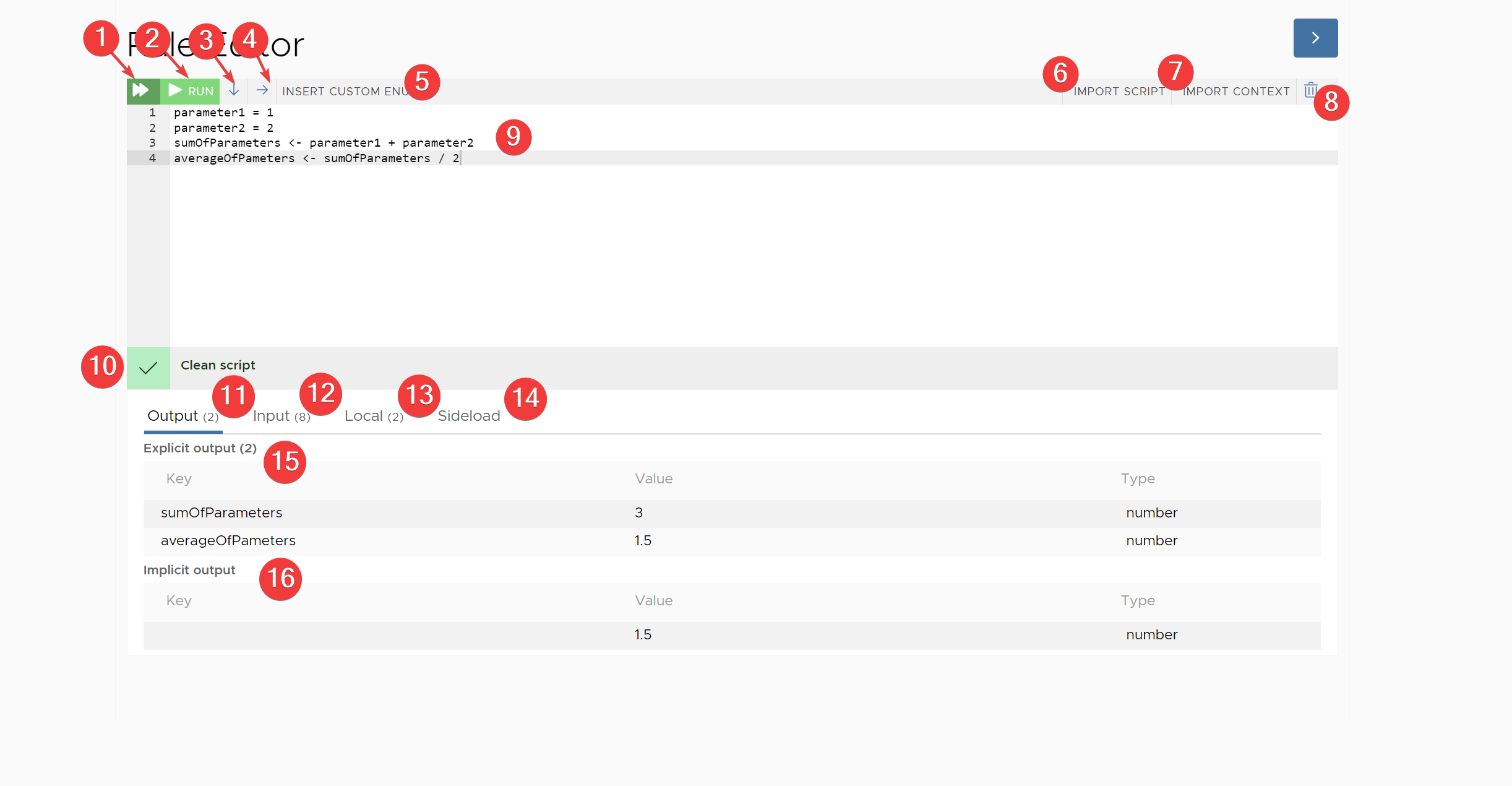
- Provides a fast run option, this will run the script to completion and will not return any intermediate results. This is the fastest option if you want to see the result of the script.
- This will run the script in the front-end but it will provide intermediate updates. This means the row that is currently running will be highlighted as the script is running and the different channels of the rules context (see 11, 12, 13, 14) will be updated.
- This wil halt the script at every new line that the script is executing. This gives the user the opportunity to inspect the different channels of the rules context before advancing to the next script row.
- This will halt the script at every new operation that the script is executing. This means that it will halt multiple times a row and will show an intermediate result after every small operation that has been executed in the script run. This is very slow debugging but can be helpful to debug strange behaviour that happens on a single line of script.
- This will open a small popup as an input helper to select the custom enum and its value to be used in the script. Because the custom enum is tricky to write by hand, because the script expect the id of the custom enum and the id of the custom enum component, it is less error prone to use the input helper.
- Can be used to import a script, that is generated by the system for specific use cases (like a pricing calculation) into the editor.
- Can be used to import a specific context into the input channel (see 12) to get a context of a specific entity into the rules context of the editor.
- This will clear all channels of the rules context in the editor and will start with a new fresh and empty rules context
- This is the actual scripting area where scripts can be written
- After the user stops writing the system will validate the script and verify if the syntaxt of the script is correct. If the syntax is correct is will be a green check. If the syntax is wrong it will show a syntax error:

- Output channel: the output channel is split into 2 sections:
- Explicit output section (marked with 15): all values assigned with the ‘<-’ operator will be found in the explicit output of the rules context.
- Implicit output section (marked with 16): the result of the final line of script will be returned as the implicit output of the script. This can be usefull in places where a small rule is sufficient to write a small piece of logic, for example
inputPricing.totalValue < 100000as a small rule to determine if a pricing can activate automatically or needs a human validation before the pricing can be activated
- Input channel: the input channel will show all inputs that have been loaded by the import context button (marked by 7).
- Local channel: the local channel shows all variables that have been assigned using the ‘=’ operator
- Sideload channel: all provided sideload variables are shown in the sideload part of the rules context
2 - Scripting language
Scripting language of the BRE
Scripting language reference
This page is the language reference for the BRE (business rule engine) scripting language used throughout the Vertex platform. It covers the statement model, the data types, the operators and the control flow constructs, with worked examples for the pitfalls new rule authors run into. Every code example on this page is executable as written and is pinned by a docs_* script case in EE.Library.UnitTests\Rules\ScriptCases, so the documented behavior is the tested behavior.
Working in the script editor
- On the Vertex home page press the button “script library” to access all the scripts that have currently been made.
- Then press the button “new script” to create a new script.
- Select a name and potentially also a description for your script and press on “create and add properties”. A text editor will open where you can edit your script.
A context can be entered into the script by pressing the “import context” button on the top right of the script text editor. This context provides variables that can be accessed from within the script. All the available variables for a certain context can be viewed by importing that context and opening the “input” tab under the text editor. Pressing the green “run” button runs the script and fills the output tab underneath the editor.
Statements
A script is a sequence of statements. Each statement is an expression; an assignment is an expression too. When the script finishes, the value of the last evaluated statement is the result of the script (next to whatever was explicitly assigned to the output, see Variables and assignment).
parameterName1 = 1
parameterName1 + 1
Result: 2. The first line stores a value under the name parameterName1, the second line reads it back and produces the script result.
Statement separators: newline or ;;
Statements are separated by a line break, by the ;; separator, or a mix of both. These two scripts are identical:
price = 10
quantity = 4
price * quantity
price = 10;; quantity = 4;; price * quantity
Result of both: 40. Use ;; when statements must share a line, for example inside a single-line block. A single ; does NOT separate statements - it separates arguments and elements, which is the next topic.
One character apart: ; vs ;; vs : vs ,
Four separators look alike but mean very different things. Getting these wrong is the most common beginner mistake in this language.
| Separator | Meaning |
|---|---|
; |
Separates method arguments, collection elements and object properties: pow(10; 2), c[1; 2], {A: 1; B: 2} |
;; |
Separates statements on one line: a = 1;; b = 2 |
: |
Separates an object property key from its value: {Price: 10} |
, |
A decimal separator inside a number - NEVER an argument separator |
The comma deserves special attention. 1,5 is one single number token, so a call like this does not do what it appears to do:
round(1,5)
This is a call to round with ONE argument, not two. The engine reads 1,5 as a single number: in a rule context whose input culture uses the comma as decimal separator that number is 1.5 (so this parses as round(1.5)), and in a point-decimal culture such as en-US the comma is a thousands separator and the number is 15. Either way round then fails at run time, because it requires two arguments (the value and the number of decimals). Arguments are always separated with ;:
round(1.5; 0)
Result: 2.
Both decimal separators are accepted
The grammar accepts both . and , inside a number literal. Which one denotes the decimal fraction is decided by the input culture of the rules context the script runs in: 1.5 is one and a half under en-US but fifteen under nl-NL (where . groups thousands), and vice versa for 1,5. Write number literals with the decimal separator of the context your script runs in, and keep the previous section in mind: a comma never separates arguments.
Data types
Numbers
All numeric values share one number type. Standard arithmetic works as expected, including scientific notation and repeated signs:
0.5+0.5
((1+1)+1)
--1
1e10
10/2
10^2
The lines evaluate to 1, 3, 1, 10000000000, 5 and 100 (the last line is the script result). ^ is the power operator and --1 resolves to 1 because the two unary minus signs cancel out.
Booleans
TRUE and FALSE (in any casing, see Case-insensitivity) form the boolean type. Booleans are typically produced by the relational operators:
1 > 0
10 <= 10
2 != 2
The lines evaluate to true, true and false. Booleans combine with the logical operators:
NOT true
true AND false
true OR false
The lines evaluate to false, false and true. Boolean literals are case-insensitive:
(true == TRUE) AND (False == FALSE)
Result: TRUE.
null
null represents the absence of a value and is case-insensitive as well:
IsNull(null) AND IsNull(NULL) AND IsNull(NuLl)
Result: TRUE. Use IsNull to test for it; numeric() without arguments produces a null number:
IsNull(numeric())
IsNull(36)
The lines evaluate to true and false.
Strings
A string literal is text between single or double quotes:
"This is a string"
To put a quote of the surrounding style inside the literal, escape it with a forward slash: /' produces ' and /" produces ":
single = 'It/'s quoted'
double = "Say /"hi/""
single + ' - ' + double
Result: It's quoted - Say "hi". Strings are concatenated with +. Note that the escape character is the forward slash /, not the backslash used in many other languages.
Date and time
A datetime value represents a specific date and time. Construct one with the DateTime method from a string in dd-MM-yyyy, dd/MM/yyyy or ISO yyyy-MM-ddTHH:mm:ss format:
DateTime('01-01-2017')
DateTime('2009-06-15T13:45:30')
The first line is midnight on 1 January 2017, the second is 15 June 2009 at 13:45:30. How a datetime is displayed depends on the output culture of the rules context.
Collections
A collection is an ordered list of values, written as c[ … ] with ; between the elements. Elements can have mixed types and can be collections themselves:
c[true;false;3;c[1;2];"hi"]
The IN and NOTIN operators test membership:
true IN c[false;true;false;true;1;2;3;'1';'hi1';'hi2']
true NOTIN c[false;true;false;true;1;2;3;'1';'hi1';'hi2']
The lines evaluate to true and false. Elements are retrieved by zero-based index with elementat:
elementat(c[10;100;1000;10000;100000];0)
Result: 10.
Objects
An object stores key-value pairs. An object literal is written between braces, with : between key and value and ; between the properties:
ThisIsAnObject = {FirstKey: c[3;true;"Hi"]}
Properties are read with the dot notation, see Property access:
order = {Price: 10; Quantity: 2}
order.Price * order.Quantity
Result: 20. An empty object is created with object(), and properties can be added or replaced through the dynamic accessor .[key], which also works with computed keys:
ThisIsAnObject = object()
ThisIsAnObject.["FirstKey"] = c[3;true;"Hi"]
ThisIsAnObject.["FirstKey"]
Result: c[3; TRUE; 'Hi'].
Custom enums
A custom enum value identifies one entry of a tenant-defined enumeration. Enum values usually arrive through the input context or decision tables; the CustomEnum(enumComponentId; valueComponentId) method constructs one explicitly from the component ids. Two enum values are equal when they refer to the same enumeration entry:
status = CustomEnum('07A3EA2F-E080-4D7C-8CDD-1150702D407F'; '8CDD4A12-2A38-4F99-A004-8BBCA8FCE65F')
status == CustomEnum('07A3EA2F-E080-4D7C-8CDD-1150702D407F'; '8CDD4A12-2A38-4F99-A004-8BBCA8FCE65F')
Result: TRUE.
Variables and assignment
The language has two assignment operators, and the difference matters:
=assigns to a LOCAL variable. Locals only exist while the script runs and are discarded afterwards.<-assigns to the OUTPUT of the script. Everything assigned with<-is returned to the caller of the script.
parameterName1 = 1
parameterName1 + 1
Result: 2, and the output channel stays empty because parameterName1 was only a local.
outputVariable <- 3
outputVariable - 2
Result: 1, and the script output additionally contains outputVariable with value 3. Output variables can be read back in the script just like locals. Variables that come from the imported context (the input) can be read but never assigned.
Variable names consist of letters, digits and underscores, and are case-insensitive: myValue and MYVALUE are the same variable.
Operators
| Category | Operators |
|---|---|
| Arithmetic | + - * / ^ (power), unicode alternatives × · for * and ÷ for / |
| Comparison | == != > >= < <= (=> and =< are accepted alternative spellings of >= and <=) |
| Logical | AND or &&, OR or ` |
| Membership | IN, NOTIN |
| Assignment | = (local), <- (output) |
Multiplication and division bind stronger than addition and subtraction, and ^ binds stronger still; use parentheses whenever the intent is not obvious at a glance. Note that a single = between two values is an assignment, never a comparison - equality is always ==.
Property access
Values with named members (objects, context inputs) are accessed with a dot:
inputPricing.totalValue < 100000
The dot and the member name must be written together: a.b is member access, but a . b is a syntax error because a free-standing . is read as a decimal separator.
When the key is not a valid name or is computed at run time, use the dynamic accessor .[expression]:
ThisIsAnObject = object()
ThisIsAnObject.["FirstKey"] = c[3;true;"Hi"]
ThisIsAnObject.["FirstKey"]
The dynamic accessor is also the only member form that can be assigned to.
Lambda arguments
Several collection methods take a small inline function - a lambda - as an argument. A lambda is written as variable $ expression: the variable is bound to each element in turn and the expression is evaluated for it.
any(c['hi';'hello';'dag';'test';'nn']; x $ x == 'test')
any(c['hi';'hello';'dag';'test';'nn']; x $ x != 'test')
Both lines evaluate to true (any asks whether at least one element matches).
all(c['hi';'hello';'dag';'test';'nn']; x $ IsString(x))
all(c['hi';'hello';'dag';'test';'nn']; x $ x == 'thisisnotonthelist')
The lines evaluate to true and false (all asks whether every element matches). Other lambda-taking methods such as select and groupby follow the same x $ expression shape.
Comments
Two comment forms exist, and both are completely invisible to the engine:
//comments out the rest of the line./*…*/comments out everything in between, may span multiple lines, and may even sit in the middle of an expression.
// the base price
price = 10 // a trailing comment
total = /* tax */ price + 5
/* block comments
   can span lines */
total
Result: 15. Comment markers inside a string literal keep their literal meaning: 'http://example.com' is just a string. A /* must always be closed with */, otherwise the script has a syntax error.
Control flow
IF / ELSEIF / ELSE
The conditional is an expression: IF condition THEN result ELSEIF condition THEN result ELSE result. It produces the value of the chosen branch:
(IF 16 > 2*4 THEN 'HALLO' ELSE 'DOEG')
Result: 'HALLO'.
(IF 1==2 THEN 10 ELSEIF 200!=200 THEN 100 ELSEIF 30+5>30 THEN 1000 ELSE 10000)
Result: 1000. Conditions are checked top to bottom and the first true branch wins.
The braceless IF pitfall
IF has no braces and no end marker. A branch is a full statement list, so an unparenthesized IF absorbs the FOLLOWING statement lines into its branch. This script looks like it always assigns 'after the if':
IF 1 > 2 THEN
    x = 'from the branch'
x = 'after the if'
x
It does not. Both assignment lines belong to the THEN branch, the condition is false, so neither runs and the script fails with Could not find 'x' in the context. The indentation suggests a structure the language does not have.
The fix: wrap the conditional in parentheses. The closing ) unambiguously ends the IF, and everything after it is ordinary top-level script again:
y = (IF 1 > 2 THEN 'branch' ELSE 'fallback')
x = 'after the if'
y + ' ' + x
Result: 'fallback after the if'. Rule of thumb: when any statement follows an IF on later lines, parenthesize the IF.
WHILE
WHILE(condition) { body } evaluates the condition BEFORE every iteration and runs the body while it is true. The value of the loop is the value the body produced in its last iteration:
a <- 0
while(a < 5)
{
    a <- a + 1
}
Result: 5.
To protect against endless loops the engine stops a WHILE after 10000 iterations by default and raises the error Maximum number of iterations ('10000') reached. A loop that legitimately needs a different bound passes it as the second argument, separated - as always - with ;:
i = 0
while(i < 3; 10)
{
    i = i + 1
}
i
Result: 3 (the loop ran three times, well within its explicit bound of ten). The bound argument raises or lowers only the safety limit; it never changes how often the condition is checked.
FOREACH
FOREACH(variable IN collection) { body } runs the body once for every element, with the element bound to the variable:
number = 0
foreach(x in c[1;2;3]){
number = x + number
}
number
Result: 6.
SEQUENCE
SEQUENCE { statements } groups a statement list into one expression whose value is the last statement’s value. Use it where a single expression is expected but several steps are needed:
sequence {
    subtotal = 40
    subtotal * 1.21
}
Result: 48.40. Note that the { must be on the same line as the sequence keyword; a line break between them is a syntax error (unlike WHILE and FOREACH, which do allow the brace on the next line).
Case-insensitivity
The language is case-insensitive across the board:
- Keywords:
if/IF,then/THEN,while/WHILE,foreach/FOREACH,sequence/SEQUENCE,and/AND,or/OR,xor/XOR,not/NOT,in/IN,notin/NOTIN- any casing works. - The literals
TRUE,FALSEandnull. - Method names.
- Variable names.
(if TRUE then 'yes' else 'no') == (IF true THEN 'yes' ELSE 'no')
Result: TRUE.
ROUND(2.5; 0) == round(2.5; 0)
Result: TRUE. Pick one casing convention and stick to it for readability - the engine does not care, but your colleagues do.
Built-in methods
The sections below show commonly used built-in methods per data type with examples. Methods are called as name(argument; argument; ...) and their names are case-insensitive.
Number methods
| Syntax | Explanation | Script | Output |
|---|---|---|---|
| Log(N) | Returns the logarithm base 10 of the number N | log(10) | 2.30258509299405 |
| exp(N) | Returns the number N to the power of e - Euler's constant | exp(1 / 365) | 1.00274348250654 |
| sqrt(N) | Returns the square root of the specified number N | sqrt(2^10) | 32 |
| pow(N1;N2) | Returns N1 to the power of N2 | pow(10;2) | 100 |
| mod(N1;N2) | Returns N1 modN2, i.e. the remainder of N1/N2 | mod(3;3) | 0 |
| remainder(N1;N2) | Returns N1 modN2, i.e. the remainder of N1/N2 | remainder(5;3) | 2 |
Boolean methods
| Syntax | Explanation | Script | Output |
|---|---|---|---|
| ToBoolean(N) | Returns true when N is larger than 0 and false when N is 0 or smaller. | ToBoolean(1) | true |
| IsNull(A) | Returns true if A is of type null | IsNull(numeric()) IsNull(36) | true false |
Collection methods
| Syntax | Explanation | Example Script | Example Output |
|---|---|---|---|
| sum(C) | Sums all the elements in the collection | sum(c[1;2;3;4;5]) | 15 |
| max(C) | Returns the maximum element in the collection | max(c[1;2;3;4;5]) | 5 |
| min(C) | Returns the minimal element in the collection | min(c[1;2;3;4;5]) | 1 |
| count(C) | Counts the number of elements in the collection | count(c[1;2;3;4;5]) | 5 |
| avg(C) | Calculates the average of all the elements in the collection | avg(c[1;2;3;4;5]) | 3 |
| average(C) | Calculates the average of all the elements in the collection | average(c[1;2;3;4;5]) | 3 |
| wavg(C1;C2) | Outputs the average of C1 where the elements are weighted by C2 | wavg(c[10;25;15;40;10];c[10;100;1000;10000;100000]) | 14176 |
| elementat(C; N) | Outputs the element at index N in collection C | elementat(c[10;100;1000;10000;100000];0) | 10 |
| take(C; N) | Returns the first N elements of the collection C into a new collection | take(c['hi';'hello';'dag';'test';'nn']; 2) | c['hi';'hello'] |
| skip(C; N) | Returns a collection of the elements of C after the Nth index | skip(c['hi';'hello';'dag';'test';'nn']; 3) | c['test';'nn'] |
| additem(C; A) | Returns a collection which is the original collection C appended by the new element A to its end | additem(c['hi';'hello';'dag';'test';'nn']; 3) | c['hi';'hello';'dag';'test';'nn'; 3] |
| any(C; x $ A(x)) | x Loops over all elements in C, returns true if any of the variables satisfy the condition A, which includes x | any(c['hi';'hello';'dag';'test';'nn']; x $ x == 'test') any(c['hi';'hello';'dag';'test';'nn']; x $ x != 'test') | true true |
| all(C; x $ A(x)) | x loops over all elements in C, returns true if all elements of C satisfy the condition A, which includes x | all(c['hi';'hello';'dag';'test';'nn']; x $ IsString(x)) all(c['hi';'hello';'dag';'test';'nn']; x $ x == 'thisisnotonthelist') | true false |
Datetime methods
| Syntax | Explanation | Example Script | Example Output |
|---|---|---|---|
| DateTime(S) | Generates a datetime object. The specific date and time are specified by the string S. S can have multiple formats:
| DateTime('01-01-2017')
DateTime('2009-06-15T13:45:30') | 01-01-2017 00:00:00 15-06-2009 13:45:30 |
Time series methods
The BRE can be used for the retrieval and manipulation of time series from Vertex.
| Syntax | Explanation | Example Script | Example Output |
|---|---|---|---|
| tsselector(A; B; C; D; E) | Selector which refers to a specific time series in Vertex by its time series code (A), data slot reference (B), revision (C), ..., ... . Note that the last three arguments are optional. | tsselector('ME20191101009'; 'SalesPortfolio_ME20191101009:P_PFC_VOL_ZERO') | |
| getts(A; B; C) | getts() |
Other methods
| Syntax | Explanation | Example Script | Example Output |
|---|---|---|---|
| format(A; B) | Formats input A as specified by the string B. Note that for some cases, the formatting is also influenced by the context, such as a geolocation. | Format(DateTime('02/01/2015');'dd-MM-yyyy')
| 02-01-2015 |
| exists(A) | Returns true if A is some object that has been defined within the code or has been predefined as a context or global variable or object. | exists(ThisVariableWasNotDefined) exists(0) exists(null) | false true true |
3 - Technical details
Technical details of the BRE engine and scripting language
TODO:
- Cursor
- Reference date time
The business rule engine (BRE) is a component that brings decision making to the user while still having most of the process orchestrated by Vertex.
Technical details
There are a few technical details that can help in understanding how the BRE works:
Data context members (DSC)
The Rule Context can house many different kind of Data Context Members (DCM). These DCMs contain a type for strongly typed values, the value itself and a reference to how the value was created using a DataSourceDescription (DSD). The types of data context members supported are:
- BooleanDataContextMember
- CollectionDataContextMember
- ConsequenceDataContextMember
- CursorDataContextMember
- CustomEnumDataContextMember
- DateTimeDataContextMember
- ErrorDataContextMember
- NumericDataContextMember
- ManualDataContextMember
- ObjectDataContextMember
- StringDataContextMember
- VoidDataContextMember
- PeriodDataContextMember
- TimeSeriesSelectorDataContextMember
- TimeSeriesVectorDataContextMember
Data Source Description (DSD)
The data source description are used to track where a result is created from. If a result is provided by a input context that value will have a trace back to the entity that contains that value. If the value was read from a decision table the data source description will have a reference to the decision table version id. And if the value was created by calculating multiple values together it will be marked as a calculated value and the inputs of that calculation will be added as parents to that new DSD of type calculated. This way we can trace the origin of any value back to its source.
Lexer, Parser and finally an operation tree
The BRE scripting language is created as a grammar that processed into a operation tree. This operation tree is a stateless set of operations that can mutate the state of an Rules Context provided to the operation tree. Because the tree is stateless it is possible to keep the entire operation tree in memory and use it do high performance calculations on the operation tree without the need to interpret the BRE scripts again.
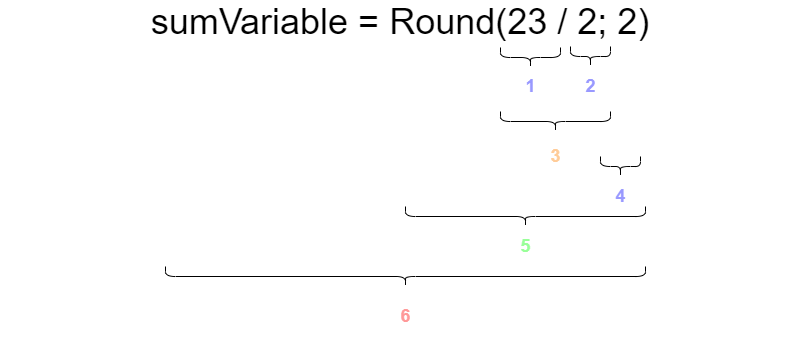
- Operation that creates a constant ouput of the decimal ‘23’
- Operation that creates a constant output of the decimal ‘2’
- A native operand to divide the output of operation 1. by the ouput of operation 2.
- Operation that creates a constant output of the decimal ‘2’
- A call to the method operation for the method ‘Round’, with as first parameter the output of operation 3. and as second parameter the output of operation 4.
- A native operand that assigns the operation after the ‘=’ sign to the locals dictionary of the Rules Context locals, with the ‘sumVariable’ string as the key and the output of operation 5. as the value
The operations are stateless and they will either provide a intermediate result that is consumed as input for other operations or they can interact with the Rules Context to alter the state of one or more of the channels.
Operation round-trip fidelity rule
An operation tree can be rendered back to a script (Operation.ToString with FormattingTypes.Script, exposed as RulesEvaluator.ReformatScript). This round-trip MUST preserve the meaning of the script exactly:
- The regenerated script must parse cleanly and evaluate to the same result as the original.
- Every construct, argument and operator must survive the round-trip. A dropped argument (for example a
WHILEiteration bound) is a defect, not a formatting difference. - Only whitespace and redundant parentheses may differ between the original and the regenerated script.
- Comments are lexer trivia and are not part of the operation tree, so the operation round-trip does not carry them. Any user-facing feature that regenerates a script a user wrote must therefore work from the token stream (which contains the comments) instead of the operation tree.
The rule is enforced per script case in EE.Library.UnitTests\Rules\ScriptCases: every case records what the round-trip currently produces, the regenerated form must stay parseable, and for cases with a recorded result the regenerated form must evaluate to that same result. Known violations are tracked as an explicit, shrinking list next to those tests and are defects to fix, not accepted behavior.
Rules Context
The Rules Context will act as the state store for a specific run of the BRE. The Operations Tree that performs the calculation is stateless itself, all it does is change the state of the Rules Context object. The object is devided into 5 channels, each channel consists of a dictionary that can be interacted with the help of the operations.
The local channel
This channel is used for intermediate results that help with scripting over multiple lines. With a simple assign in script parameterName1 = 1 the decimal data context member with a value of ‘1’ can be entered into the local channel under the key ‘parameterName1’. When the script later want to use the ‘parameterName1’ variable it can simple do so by referencing its variable name. parameterName1 + 1 will retrieve the value of ‘parameterName1’ from the local channel and make the value availble to the addition operand so it can add 1 to the stored value.
The data that is stored in the locals is only relevant during the run of the BRE script and will not be communicated to the caller of the script, its data will be deleted after the Rules Context is no longer needed.
The output channel
The output channel is comparable to the local channel, except that this channel is used as the explicit output of the script and returned to the caller that started the BRE calculation. To assign data to the output channel the <- assign command is used instead of the = that we use for the locals. This means that outputVariable <- 3 will assign the decimal data context member to the output channel under the provided ‘outputVariable’ name. This means that the output of the script will also contain the ‘outputVariable’, with its value 3. Values of the output channel can also be used in script to read back from the output channel, so we can do outputVariable - 2 to calculate a value of 1.
The input channel
The intput channel is provided at the beginning of the script and is provided as a initial value inside de Rules Context. These values can be read from, but they cannot be altered as there is no way to write into the input channel. The input in the input channel is normally provided by the caller of the BRE script run and is tuned to the context in which the BRE script is running. Examples of a input context could be a Pricing Request, a Pricing, a deal or an order.
The sideload channel
The sideload channel is a special channel that can override specific assignments to the output channel. The values that are availible in the sideload channel will replace the output of a output assign value to the value of provided by the sideload channel at the moment it is assigning it to the output channel. This is used to feed manually provided values back into the script and to alter intermediate variable as well.
This means that is we prepare the sideload channel with a value of ’thisValueMightBeOverwritten’ with a value of 5, the followin script thisValueMightBeOverwritten <- 3 will be intercepted by the sideload channel. This means that the result stored in the output channel will be the sideloaded value of 5, and this also means that if we use the ’thisValueMightBeOverwritten’ in a later part of the script it will also be returned as a 5. Ultimately rendering the following script thisValueMightBeOverwritten + 1 to return 6, instead of the 4 that we would have expected would there be no sideload value for ’thisValueMightBeOverwritten’.
The back channel
This channel is used by methods to exchange metadata with each other. Rather then having the user do all the heaving lifting by having to add a lot of metadata to the outputs the back channel can be used to add implicit metadata from one method to the other. The back channel is divided in a number of sections. The currently active section can be changed by calling a ‘ChangeSection’ operation, but this method is normally not called by a user in a normal script. This operation is injected by the system when we create a large operation tree from a mix of scripts and system configuration. By changing selections in our generated code we can easily provide metadata to that section. This makes it easy to collect data like decision tables that are used and the current pricing product element that is being calcualated. This enables us to have all the delecate moving pieces out of sight of the user and have the user just focus on the business decisions that need to be implemented. Besides the flow of metadata the back channel also enables the logging method that can collect all logs without the user having to explicitly collect the logs for the BRE run.
Diagnostics tips
There are a few tips that can help when debugging a script issue:
- Use the script provider for decision trees to view the generated script to resolve a decision table
- Use the ToOperationTree method to get a annotated string that shows the operations that are defined by a single linke of script provided to the method
Method Provider plugins
TODO
4 -
5 - RuleEngine Domain
This page presents the ERD for each AggregateRoot, grouping related entities into domain boundaries. Each AggregateRoot enforces business rules, processes commands synchronously, and defines consistency borders within a single transactional scope. An indicative json schema is created to how the export of a aggregate root will approximitly look like
Script
Aggregate Root: Script
Represents business rule scripts with their versions for automated decision making and processing.
erDiagram
    "RuleEngine.ScriptVersions" {
        uniqueidentifier Id PK
        uniqueidentifier ScriptId FK
        bit Draft
        nvarchar VersionString
        nvarchar Comment
        nvarchar ScriptValue
        uniqueidentifier Tenant
        datetimeoffset EntityCreatedDateTime
        datetimeoffset EntityUpdatedDateTime
        uniqueidentifier EntityCreatedAuthToken
        uniqueidentifier EntityUpdatedAuthToken
        bit Concealed
    }

    "RuleEngine.Scripts" {
        uniqueidentifier Id PK
        nvarchar Name
        nvarchar Description
        uniqueidentifier Tenant
        datetimeoffset EntityCreatedDateTime
        datetimeoffset EntityUpdatedDateTime
        uniqueidentifier EntityCreatedAuthToken
        uniqueidentifier EntityUpdatedAuthToken
        int ScriptType
        bit Concealed
    }

    "RuleEngine.ScriptVersions" }o--|| "RuleEngine.Scripts" : "ScriptId"
erDiagram
    "RuleEngine.ScriptVersions" {
        uniqueidentifier Id PK
        uniqueidentifier ScriptId FK
        bit Draft
        nvarchar VersionString
        nvarchar Comment
        nvarchar ScriptValue
        uniqueidentifier Tenant
        datetimeoffset EntityCreatedDateTime
        datetimeoffset EntityUpdatedDateTime
        uniqueidentifier EntityCreatedAuthToken
        uniqueidentifier EntityUpdatedAuthToken
        bit Concealed
    }

    "RuleEngine.Scripts" {
        uniqueidentifier Id PK
        nvarchar Name
        nvarchar Description
        uniqueidentifier Tenant
        datetimeoffset EntityCreatedDateTime
        datetimeoffset EntityUpdatedDateTime
        uniqueidentifier EntityCreatedAuthToken
        uniqueidentifier EntityUpdatedAuthToken
        int ScriptType
        bit Concealed
    }

    "RuleEngine.ScriptVersions" }o--|| "RuleEngine.Scripts" : "ScriptId"
{
"definitions": {
"RuleEngine.Scripts": {
"properties": {
"Concealed": {
"type": "boolean",
"description": "bit"
},
"EntityUpdatedAuthToken": {
"format": "uuid",
"description": "uniqueidentifier",
"type": "string"
},
"Id": {
"format": "uuid",
"description": "uniqueidentifier",
"type": "string"
},
"ScriptType": {
"type": "integer",
"description": "int"
},
"Description": {
"type": "string",
"description": "nvarchar"
},
"EntityCreatedDateTime": {
"format": "date-time",
"description": "datetimeoffset",
"type": "string"
},
"Name": {
"type": "string",
"description": "nvarchar"
},
"EntityUpdatedDateTime": {
"format": "date-time",
"description": "datetimeoffset",
"type": "string"
},
"EntityCreatedAuthToken": {
"format": "uuid",
"description": "uniqueidentifier",
"type": "string"
},
"Tenant": {
"format": "uuid",
"description": "uniqueidentifier",
"type": "string"
}
},
"type": "object"
},
"RuleEngine.ScriptVersions": {
"properties": {
"ScriptId": {
"type": "string",
"description": "FK to RuleEngine.Scripts"
},
"VersionString": {
"type": "string",
"description": "nvarchar"
},
"EntityUpdatedAuthToken": {
"format": "uuid",
"description": "uniqueidentifier",
"type": "string"
},
"Concealed": {
"type": "boolean",
"description": "bit"
},
"EntityCreatedAuthToken": {
"format": "uuid",
"description": "uniqueidentifier",
"type": "string"
},
"EntityUpdatedDateTime": {
"format": "date-time",
"description": "datetimeoffset",
"type": "string"
},
"ScriptValue": {
"type": "string",
"description": "nvarchar"
},
"Comment": {
"type": "string",
"description": "nvarchar"
},
"Tenant": {
"format": "uuid",
"description": "uniqueidentifier",
"type": "string"
},
"Id": {
"format": "uuid",
"description": "uniqueidentifier",
"type": "string"
},
"EntityCreatedDateTime": {
"format": "date-time",
"description": "datetimeoffset",
"type": "string"
},
"Draft": {
"type": "boolean",
"description": "bit"
}
},
"type": "object"
}
},
"title": "RuleEngine.Script",
"$comment": "Generated from Mermaid ERD with property-level descriptions",
"$schema": "http://json-schema.org/draft-07/schema#",
"type": "object"
}