Security
Auth
The Vertex authentication and authorization is build on top of the proven ASP.NET core authentication library. This library is a popular solution used in many software solutions, it is proven and tested by a community and backed by Microsoft.
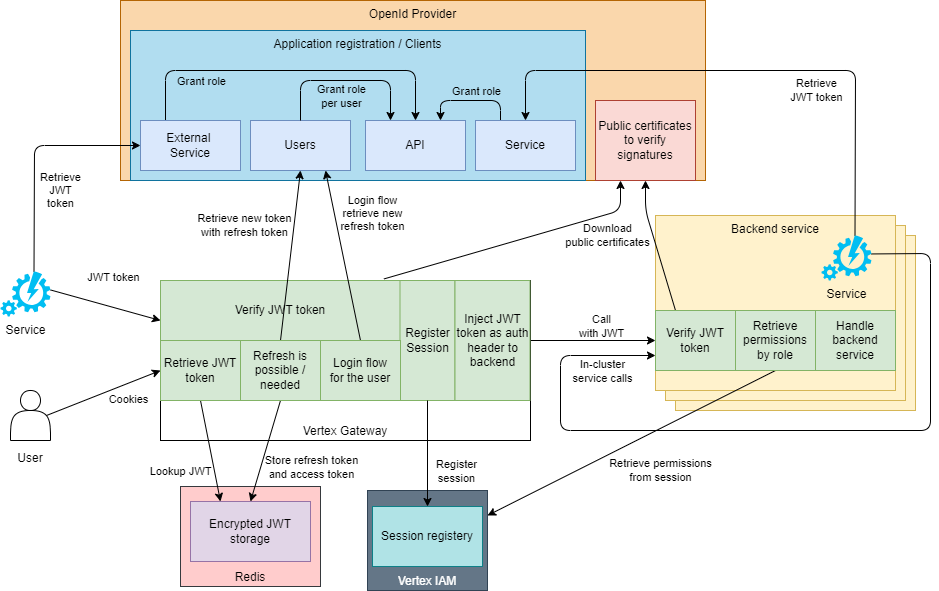
The high level overview of the authentication components in and out of the cluster. The OpenId component has 4 different registrations:
- Any external application: the client id and client credentials are registered in the application and the application is responsible for retrieving and keeping a JWT token up to date, there is no refresh token for a client_grant
- A Users application: the client id and client credentials are registered in the Vertex Gateway, this client credentials gives the gateway the permission to retrieve a refresh token on behalf of the user. The refresh token and the access tokens are stored in an encrypted section of Redis. On every call to the gateway the token is checked if a refresh is needed and if needed the gateway will refresh the token on behalf of the user. It will store the new access token and refresh token in the encrypted section of Redis. There is a user checking in the Vertex front-end that will make sure the session is kept alive in the gateway. If the front-end is closed the token will expire and a new login is required.
- An API application: the API registration is the registration that is the protected resource. The id of this registration is added to the scope to make sure the api ID is the registered audience for the user and application JWT token. The backend services that are protected with the registration will check if JWT tokens are: signed by the registered OpenId provider ánd the audience is equal to the API registration id.
- An Vertex Service application: this service user is used to get JWT tokens for the Vertex modules themselves and is used to call internal services between the Vertex applications.
Building roles specific to an environment
Because there are many permissions we generate a set of managed roles. These managed roles are a vision of what a role can be. These roles can be used as building blocks to fine-tune roles for a specific Vertex rollout. The managed roles can always be bypassed and fully custom roles can be defined if preferred or required.
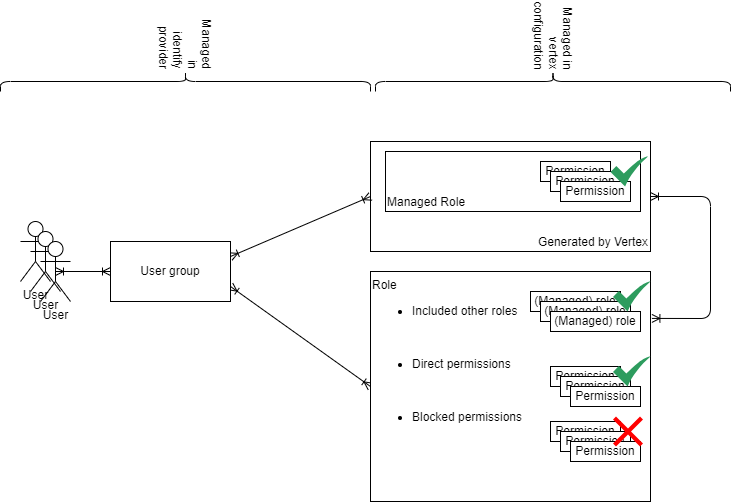
Assign roles
The assignment of roles is a crucial step in managing access to Vertex. This process is overseen by the OpenId provider of choice withing the company. Because of the trust relation with the OpenId provider all tools already in use in the company can be re-use for role management. There are 2 typical ways to manage roles for the users of Vertex:
- Direct Assignment: Roles can be directly assigned to individual users in the OpenId provider. This method is suitable for granular control where specific permissions need to be granted to individual users based on their responsibilities or requirements.
- Group-Based Assignment: Assigning roles to OpenId provider groups is an efficient way to manage permissions for a set of users. This approach leverages the existing group structures within the organization, allowing for streamlined access management.
- Integration with existing tooling: If there is already a permission enrollment procedure available within the company it can be used to assign roles (or groups by mixing this with option 2) to users based on a onboarding process or access management portal/system.
Revoke a role
If a role is revoked the next interaction with the OpenId provider (by new login or if a refresh token is used on the users behalf) will issue a new JWT token to use with the resources. This JWT token will have the update roles and the permissions will be automatically scoped to the roles that are available in the JWT token, effectively revoking the permissions with a managed time frame. The lifetime of the JWT tokens retrieved with the refresh token is configured on the OpenId provider itself, making sure that the lifetime of the token can be managed by the company.
Vertex Gateway
Vertex authentication has been rebuilt to work with an OpenID provider, like Azure AD. The roles are defined in the OpenID provider and assigned to the user. After configuring the Vertex with a specific OpenID Provider, it will trust all tokens issued by this provider and will validate the JWT tokens against the public keys of this OpenID provider. The mapping between a Role and a specific permission is done in the application configuration that is provided through the Vertex GitOps repository. Vertex does track sessions as it encounters them in the JWT tokens and it will create an entry in its Identity Access Management module database so that changes done by this session can be linked to a specific user and session combination. This information is the basis of the audit mechanisms that are implemented in Vertex.
Our front-end UI does not contain any auth state because the browser has no inherent safe space to store a sensitive piece of data like a JWT token while also having the option to open new tabs or refreshing the page while still being logged in. Therefor we moved the state of authentication to the Vertex Gateway and with that the JWT refresh token and access token handling to the Gateway.
The Gateway will redirect the user on non-API routes to the OpenId providers login screen. Here the user can login using the credentials and methods that are supported / provided by the OpenId provider itself. Vertex has not control over the authentication that is preformed here and only on a successful authentication the OpenId provider will redirect the user back to the Vertex Gateway with a JWT refresh token. This refresh token can be used to retrieve actual access tokens on behalf of the user. All tokens that are retrieved and will be used are also send to the IAM module so the IAM module can get the details from this access JWT token to:
- update the authoritative user information like firstname, lastname, username, display name and email
- create a new session with the session details like session identifier, start date time of the session, expiration of the session, the ip that the user used to create the session with the OpenId provider and the roles assigned to the user OR extend the existing session with the new end date time of the JWT token These access tokens are injected as bearer header into the calls that go to the backends behind the Gateway.
The APIs behind the gateway will use the bearer token to retrieve the user session details from Redis. This user session detail will contain the full list of permissions the user has rights to. If the user session is not (yet) available on Redis it will publish a PutUserSessionRequest message on redis that is picked up by the Vertex IAM module to be processed into the database and published on Redis. Once the session details appear on Redis it will read the details from the value and continue as normal. Given the list of permission the user has rights to in that session it can verify that the action the user is trying to do on the backend service is permitted by looking up the permission linked to that action in the list of permissions of the user.
Note: The Gateway needs a client secret from the OpenId provider to identify itself as an authorized application that is allowed to keep refresh tokens on behalf of the user. These refresh tokens with the client secret do not hold any permissions, as they would for a service account, it is to authorize the handling of refresh tokens on behalf of the use.
Vertex IAM
The Vertex IAM module is responsible for processing PutUserSessionRequest messages that are published on Redis. It will make sure that a session is only created once and that after processing the user session details will be published in a Redis key-value. All other modules will be monitoring the key of that session to await the user session details provided by the Vertex IAM module. The Vertex IAM module will assign the session id / AuthToken to the specific session and register all relevant user and session details in the database for later reference. The AuthToken will be tagged on all actions of the user to later link it back to a single user session of a specific user. This way we can always refer back to a specific session that a user had when a change is done somewhere in the Vertex system since everything that is event sourced, as well as all commands, will have the AuthToken stored on them.
Sequence diagram
The full flow of the interactions between the user or browser with the Gateway, backend service, OpenId provider, Redis service, Vertex IAM module can be seen in this diagram:
sequenceDiagram
    actor User
    participant Vertex Gateway
    participant OpenId Provider
    participant Backend service
    participant Encrypted Session Storage
    participant Redis
    participant Vertex IAM
    participant Vertex IAM DB
    participant Key Vault
    alt When startup of module
        Vertex Gateway->>+Key Vault: Request session encryption key
        Key Vault->>-Vertex Gateway: Send session encryption key
        Vertex Gateway->>Encrypted Session Storage: Initialize with session encryption key
        Encrypted Session Storage->>Redis:Storage generated protection keys
    end
    User->>+Vertex Gateway: Request
    alt has NO valid authorization cookie
        Vertex Gateway->>-User: Redirect to OpenId Provider
        User->>+OpenId Provider: Do authentication with OpenId Provider
        OpenId Provider->>-User: Redirect to gateway with refresh token
        User->>+Vertex Gateway: Refresh token from OpenId Provider
        Vertex Gateway->>Encrypted Session Storage: Store refresh token
        Encrypted Session Storage->>Redis: Store encrypted refresh token
    end
    Vertex Gateway->>+Encrypted Session Storage: Request access token
    Encrypted Session Storage->>+Redis: Request encrypted access token
    Redis->>-Encrypted Session Storage: Receive encrypted access token
    Encrypted Session Storage->>-Vertex Gateway: Receive access token
    Vertex Gateway->>Vertex Gateway: Decrypt to encrypted access token
    alt has NO valid access token
        Vertex Gateway->>+Encrypted Session Storage: Request refresh token
        Encrypted Session Storage->>+Redis: Request encrypted refresh token
        Redis->>-Encrypted Session Storage: Receive encrypted refresh token
        Encrypted Session Storage->>-Vertex Gateway: Receive refresh token
        Vertex Gateway->>Vertex Gateway: Decrypt to encrypted refresh token
        alt has valid refresh token
            Vertex Gateway->>+OpenId Provider: Request Access Token using the Refresh Token
            OpenId Provider->>-Vertex Gateway: Provide Access Token
            Backend service->>+Redis: Publish PutUserSessionRequest message
            Redis->>+Vertex IAM: Process PutUserSessionRequest message
            Vertex IAM->>+Vertex IAM DB: Check if user is known in the database
            alt user session is already known
                Vertex IAM DB->>Vertex IAM: User session details
            else user session was not yet known
                Vertex IAM->>+Vertex IAM DB: Create new user session
            end
            Vertex IAM->>-Redis: Publish User Session details
        end
    end
    Vertex Gateway->>+Backend service: Request with access JWT token
    Backend service->>+OpenId Provider: Get public key
    Backend service->>Backend service: Validate the JWT token signature with the public key
    alt signature is invalid
        Backend service->>Vertex Gateway: Unauthenticated response
        Vertex Gateway->>User: Unauthenticated response
    end
    Backend service->>+Redis: Get session details by session identifier
    Redis->>-Backend service: User session details or no details available message
    alt no user session details registered in Redis
        Backend service->>+Redis: Publish PutUserSessionRequest message
        Redis->>+Vertex IAM: Process PutUserSessionRequest message
        Vertex IAM->>+Vertex IAM DB: Check if user is known in the database
        alt user session is already known
            Vertex IAM DB->>Vertex IAM: User session details
        else user session was not yet known
            Vertex IAM->>+Vertex IAM DB: Create new user session
        end
        Vertex IAM->>-Redis: Publish User Session details
        Backend service->>+Redis: Get session details by session identifier
        Redis->>-Backend service: User session details or no details available message
    end
    alt user session details available
        Backend service->>Backend service: Verify that the session identifier and the roles provided in the user details match the authoritative data from the JWT token
    else (still) no user session details
        Backend service->>Vertex Gateway: Unauthenticated response
        Vertex Gateway->>User: Unauthenticated response
    end
    Backend service->>-Vertex Gateway: Successful response
    Vertex Gateway->>User: Succesfull response
Supply chain hardening
To harden our supply chain we take a set of measures throughout the software development and delivery process:
- Awareness developers and devops employees are pointed at the risks that can be introduced by software and the dependencies taken in our software
- Official libraries prefer libraries who are off high quality and high usage. These libraries have professional paid software developers working on these libraries in terms of adding code and review pull requests.
- Static Code Analysis we run static code analysis that has a security analysis that will check against OWASP Top 10, CWE Top 25 etc. standards to see if there are piece of code that require extra attention from a security perspective.
- Traceability every software version is always trace-able to a given commit in a repository, where each commit has the author of the commit registered, making changes traceable to specific users
- SBOM we generate a Software Bill of Materials for our software packages if useful during the build and from our container image (with packages for non compiled languages like python, typescript).
- Dependency Track sbom files are uploaded into OWASP Dependency Track for continues analysis of vulnerabilities
Also see Software Bill of Materials (SBOM) and Vulnerabilities
Patches
We constantly use the latest base docker container image to run our software on. With every version of the software created the latest version of that base image, with the latest patches applied, will be used. By having a steady release pace, the base layer of the containers are kept at a up-to-date patch level.
Observability
A more practical description of observability can be found here
All logging of the applications in the cluster is collected in the OpenTelemetry collector. This tool can forward any logging to a security departments systems as long as they support the open standard of OpenTelemetry. The security tool can monitor the logs for suspicious behavior if required, can keep a copy of the logs for whatever period is needed and with the necessary protections against tampering, overwriting and unauthorized access.