Observability
Operations security
Observability can play an important role in the operations security of a running Vertex application. For more details see Security documentation
Metrics, Logs, Traces and Health checks
Observability is crucial to understand the application/systems workings. It can be used for monitoring the active applications and pro-activity find bottlenecks during the operation of these applications and systems. Good observability has 4 elements:
- Logs: log lines are created in a structured way where possible (using message templates and values instead of a single string), these function as a timeline for analysis and can log warnings and error when the system needs wants to grab the attention with the log line. It is therefor a very in-the-moment, event-driven way of communicating something about the state / activity of the system.
- Traces: another timeline we can get is from the traces produced by the application. This is a very verbose log with all the activities done by the system, including their start and end moment. A tool can be used to stich all interactions of a given action in the application together giving a full waterfall perspective of all the elements that where used, in which order and how long it took each individual component to do its work.
- Metrics: metrics are statistics that are generated by the applications and systems by publishing their current metrics like number of items in queue, a distribution of the duration of all API calls coming into the system (by creating buckets that correspond to a range of response times and incrementing the bucket that has the actual response time in its range) and keeping total sums of requests. The metrics must be collected by an external system like Prometheus, because we often want to look at trends of these metrics. For example the simple incremental counter of all requests can be used to calculate the rate in which requests are done by looking at the range of historical values.
- Health checks: the health check provide a current state of the application. It is a way for the application to do a number of self check on itself. Think of checks like: can I connect to my database, is the redis service reachable for me, can I publish and subscribe on the Kafka service etc. By ingesting the health check results in a single dashboard we can see the historical health of the components and we can create a simple indication if all the components and thus the application as a whole is healthy, degraded or unhealthy at that moment. This can help communicate to the users that we might have degraded performance or features and can help the administrators to pro-actively act if the application is no longer in a health state.
OpenTelemetry
OpenTelemetry is the mechanism by which application code is instrumented, to help make a system observable. It creates a unified collection protocol that many applications and component can commutate in. The OpenTelemetry collector is used to collect traces, logs and metrics from various sources. Our default is to export this data to a elastic instance for correlation and displaying, but the OpenTelemetry collector supports a wide range of applications it can export to. Data can be forked in the collector, meaning it can be delivered to our default elastic solution but to customer specific observability solutions as well. For a list of supported exporters see here.
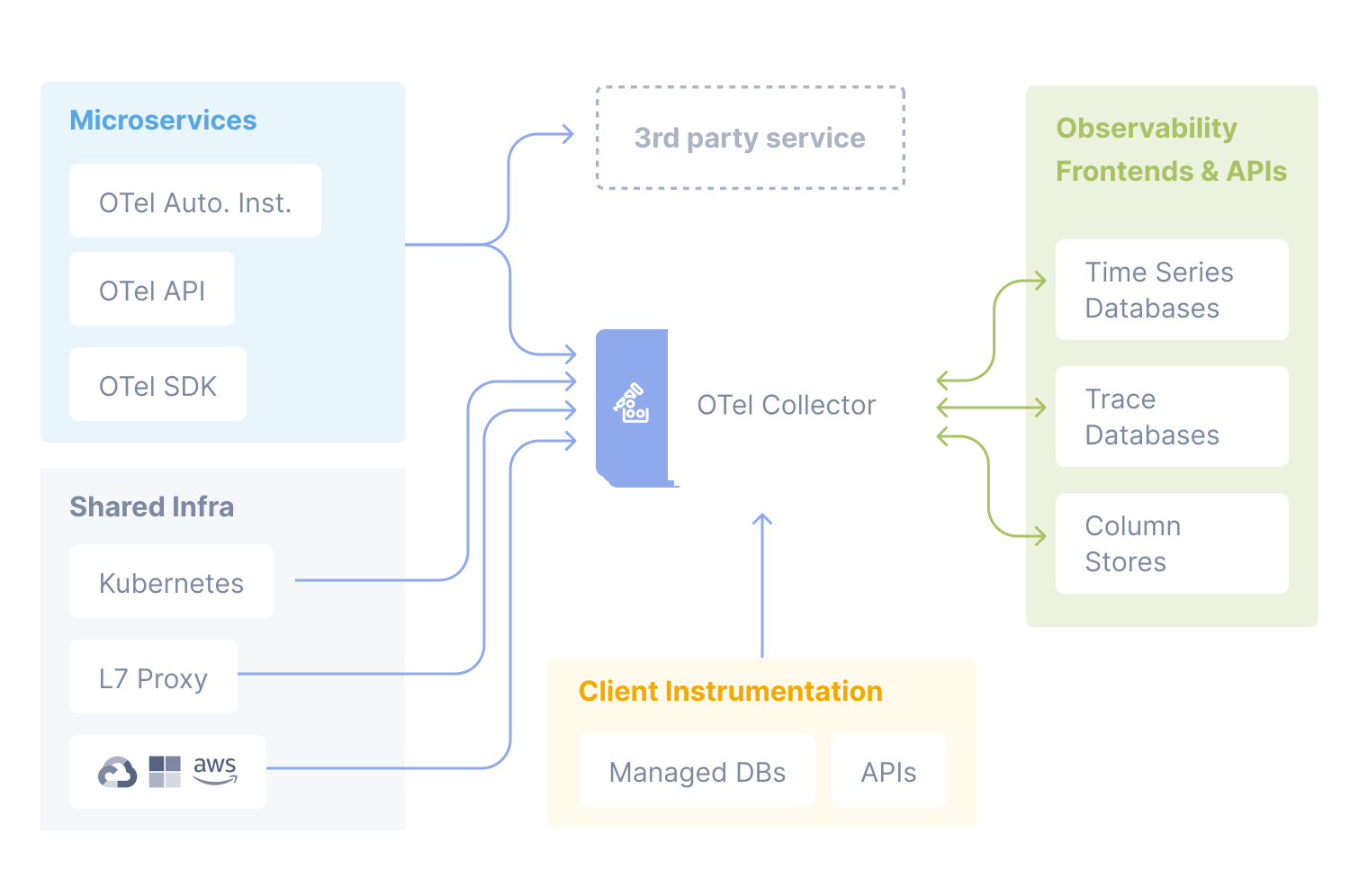
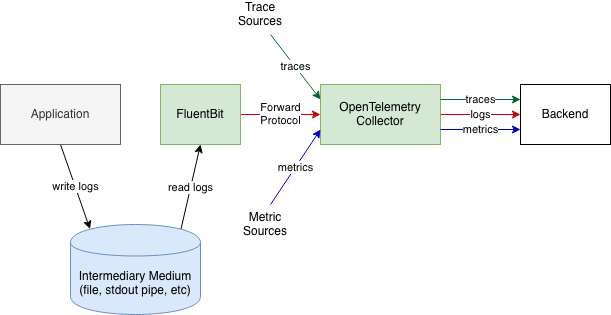
We use OpenTelemetry Collector to receive, process and export telemetry data. It removes the need to run, operate, and maintain multiple agents/collectors. It supports open source observability data formats (e.g. Jaeger, Prometheus, Fluent Bit, etc.) sending to one or more open source (or commercial) back-ends. In many cases, metric data can be scraped using Prometheus format. Most third-party applications have Prometheus exporters. We cannot always control the logs from systems, infrastructure or third-party components and enable a direct and structured shipping of these logs to our OpenTelemetry collector. In these cases, we read, pre-process and route logs using Fluent Bit, as depicted below.
Logs from VERTEX applications can be sent directly to the collector, as depicted below.
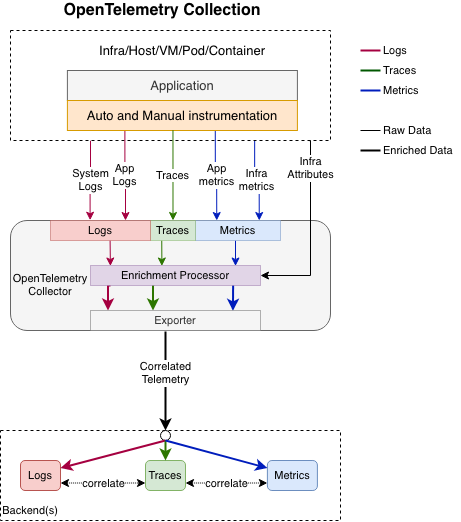
Logs can be correlated with the rest of observability data by the time of execution, by the execution context or by the origin of the telemetry. The OpenTelemetry Collector is configured such that it ships the logs to Elasticsearch. The APM Server receives data from OpenTelemetry Collector and transforms it into Elasticsearch documents. Visualization and alerting is done in Kibana and / or Checkmk.
Business Process Monitoring
For business process monitoring we have a home-brewed solution: the VERTEX Business Process Monitoring. Its purpose is to give insights into functional processes that don’t necessarily have technical linkage. It is not directly attached to any current tool but is approachable by all. This allows us to define business processes according to some configuration, add the steps we want to receive statuses on and additionally add timeouts and alerting. Time outs can be assigned based on time elapsed since last received steps, or datetime. Alerting can be set to send to multiple channels and based on certain statuses. Note: the technical process needs to send the statuses to this endpoint for the process to show the new statuses, this can be done through an API.
Autoscaling using Metrics
Most applications within the platform can be scaled up and down automatically based on load, horizontally (pods, nodes), with Horizontal Pod Autoscaling, which can use built-in metrics, Prometheus metrics, even predictive metrics to decide any change to the number of pods.