Here you can find generic architecture information for the Vertex Platform
This is the multi-page printable view of this section. Click here to print.
Here you can find generic architecture information for the Vertex Platform
Vertex is split in different components to be able to be move with the business requirements. These components can have a dependency but are split in runtime so we can have a Vertex application that is horizontally scalable and functionally modular to suite the requirements of that specific Vertex deployment.
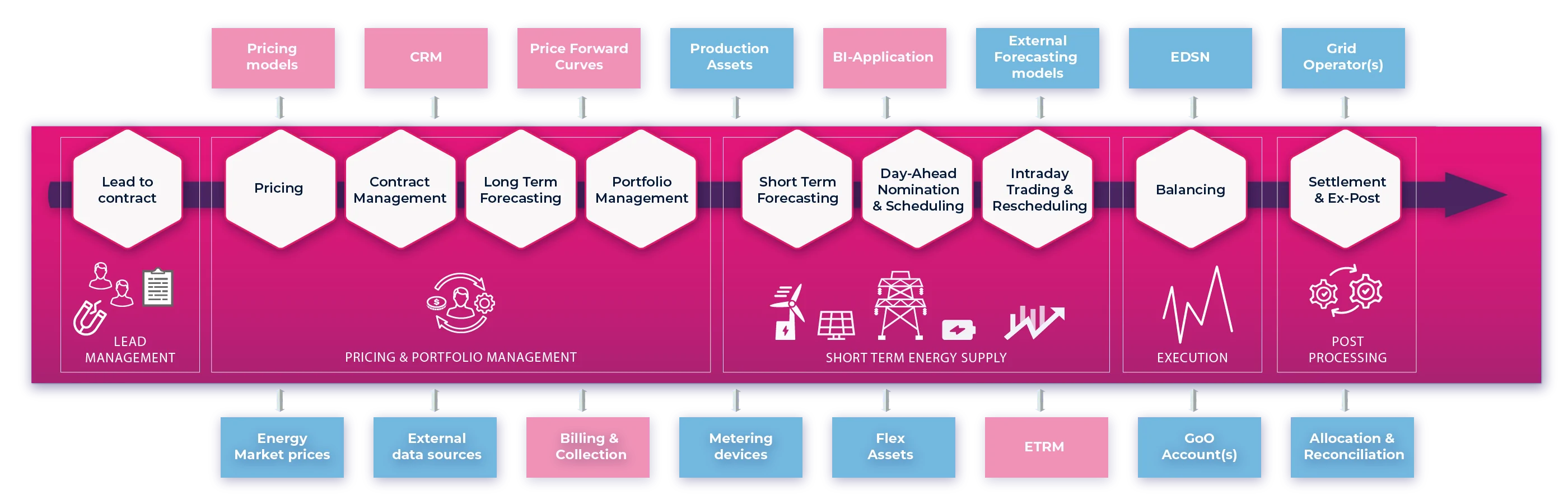
These are the components that are closes to the business processes. These modules host the entities that the user will interact with the most and will master the data that will support the business directly.
The CRM module is a module that can support with complex contract offering and has a link both the Pricing module as well as the Document Generation module. This enables it to generate standardized documents for effortless communication of offers, contracts and other customer interactions. It can directly request a price from the Pricing engine and use this information in the document send to the customer. With the sites and installations it is also possible to administer complex customers that have multiple sites, metering points and installations/assets. This administration can be used to link these elements to different ancillary services or passive imbalance services. With the
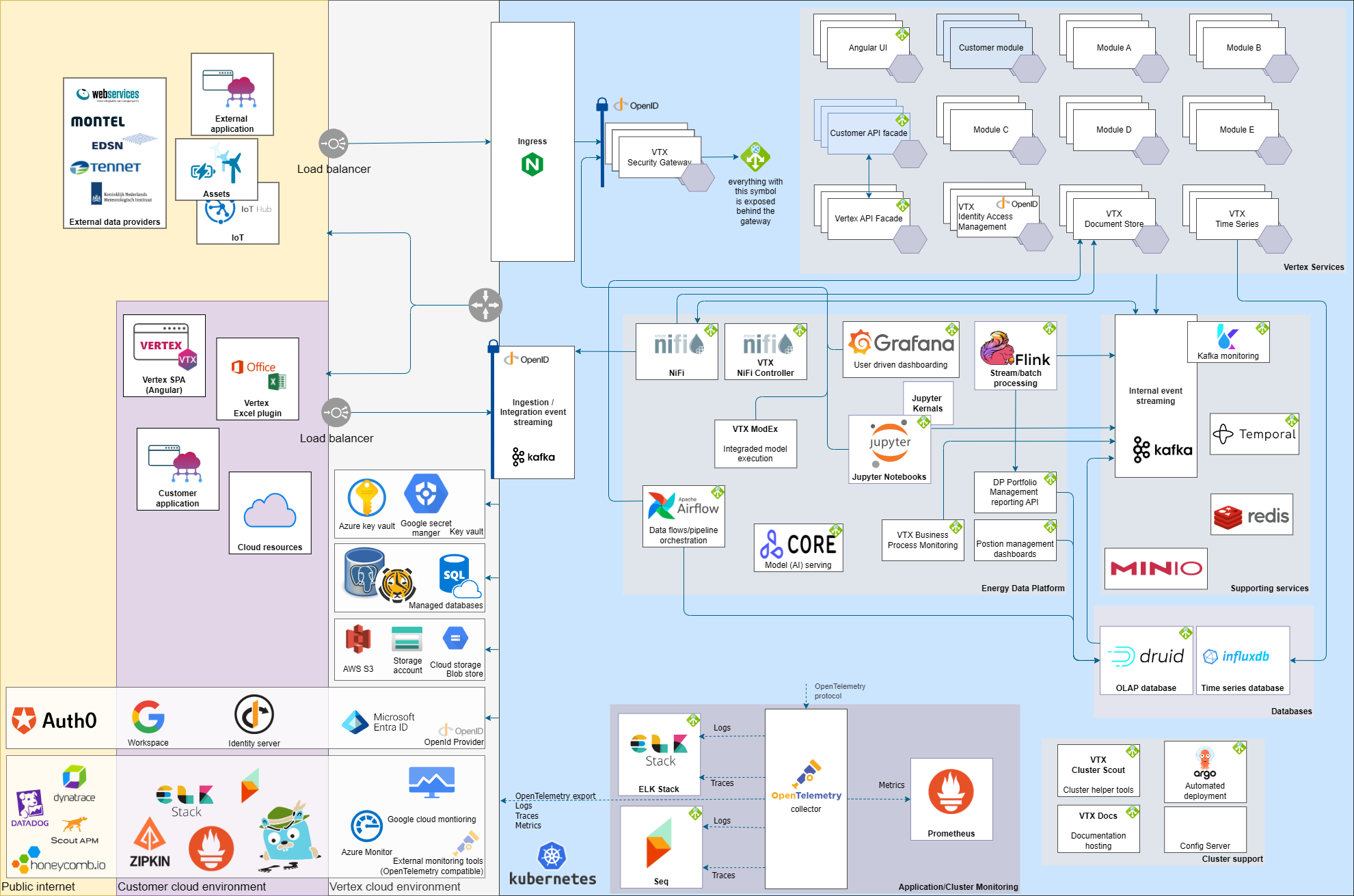
The VERTEX Energy Data Platform is an integrated set of technologies that collectively meets an organization’s end-to-end data needs. It enables the acquisition, storage, preparation, delivery, and governance of data, as well as a security layer for users and applications. Its purpose is to meet new challenges of the Energy Market. It has built-in integrations with energy parties and it is designed to work natively with VERTEX’ core modules.
Executes parameterized Jupyter notebooks, manages environment variables and gets secrets from Key Vault. Automatically scales up and down using Horizontal Pod Autoscaling.
Apache Flink is a framework and distributed processing engine for stateful computations over unbounded and bounded (= batch) data streams. Flink jobs is the preferred solution when fast (distributed) computations are needed on data streams: it features very flexible window definitions. It is a perfect solution for analyzing pattern relationships between streamed events (e.g., for interpolation, extrapolation, classification). When done in real-time, it can provide advanced insights further into the data processing system.
Processing tasks as part of a scheduled workflow orchestrated by Apache Airflow.
Apache Airflow is used for programmatically authoring, scheduling and monitoring workflows (data processing orchestration). Examples of such workflows are quality and completeness checks, after which calculations take place and are brought to an end system. Snapshotting of data, bringing data from A to B based on a schedule.
Multi-user environment managed by Energy Essentials for script development (notebooks) with relevant packages pre-installed, auto-access to relevant data, secured. The scripts are version controlled (Git) and workflows for deploying Notebooks / models into the VERTEX Energy Data Platform are enforced.
The data modules are focussed on providing a very specific data storage. These modules can be used by other modules as a specialized data store. Through the REST API of the data store it can also be used by other applications as a specialized data store.
Vertex is designed to be cloud agnostic, this means we do not primarily integrate with managed solutions that are specific to the a cloud provider.
Because the core of Vertex needs to be maintainable for the long-term it cannot have any customer specific code in its generic code, however sometimes a little bit of mapping logic or a bit of integration logic needs to be added to make Vertex work in a specific situation for a specific customer. Therefor we embrace integration points in our application using explicit plugins. This plugin system will facilitate hooks where custom process / mapping etc can be added in a maintainable way. Example of these are pricing value providers or custom actions on document types that are received into the Document Store module.
In Vertex we have a clear separation of the write side of the application from the read side of the application. We use a CQRS (Command Query Responsibility Segregation) pattern to implement this separation.
In short this means that all actions/mutations that need to be done are wrapped in a command message and published on the message bus. The command will be routed to a module that has the capability to handle that command. A command is handled by a command handler that uses an ability to create an instance of an aggregate root by replaying its history (in the form of historical events) on the aggregate root object. Using the logic in the command handler and the state of the aggregate root (containing the event-sourced write model) the implemented logic inside the aggregate root a command will be handled. This can result in a rejection where the error message is propagated to the sender of the command, or it can result in a success where the aggregate root can publish 0, 1 or more events. These events are committed to the append only event store, making it part of the history of the aggregate root and therefor part of the new write model. The events are also published on the message bus routing the event to 0, 1 or more event handlers that process the event to a read model projection, trigger other processes based on the event or trigger external integrations that need an event-driven integration.
All commands and events are provided with a reference to a specific user session, making every change in the system traceable to a specific user / service user session.
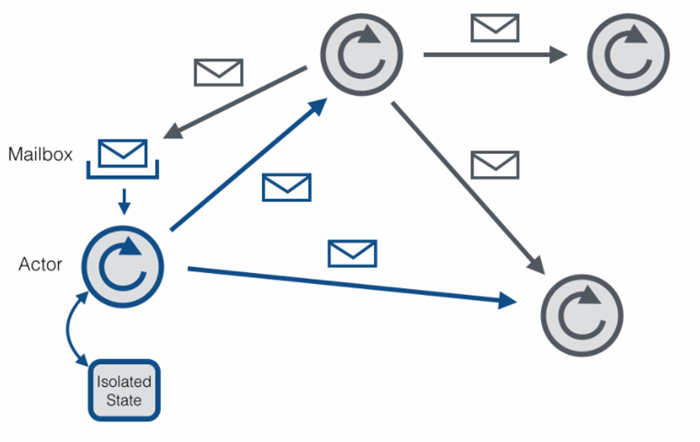
A actor is an object that contains an inbox, outbox, state and a logic loop. The actors will respond to messages that arrive in their inbox and cannot look outside their own state. They process the inputs into parts of their state and can request actions from other components in the cluster by addressing them through their outbox. It actor can only process input en look at its own state. If it requires information that is external to the actor it needs to request this information through its outbox and wait for the response on its inbox. The number of computation slots in a node are limited, and actors can be brought to sleep where their state is stored in a state store. Once re-activated their persisted state is provided and they restore their internal state. All multi-threading multi-node problems are solved by giving a single execution thread to the actor once it is activated and guaranteeing that that is the only instance of the actor running in the entire cluster.
Because the actor system is a set of mailboxes and actors an external scheduler can look at the mailboxes and calculate a metric on which the number of slots needed by the actors can be scaled. Because a new set of actor slots can be added by horizontal scaling the modules that host the actor system it works well with an application that is running on a Kubernetes solution.
By implementing the mail system in the form of a proven distributed messaging solution like Apache Kafka we can build a robust persisted messaging system between the actors.
Using the CQRS principles described above makes it easy to create a bespoke integration that can process any input to one or more commands that than can be send into the Vertex application as if they were created from the user input of the UI or an API call. Because they follow the same rout as every other mutation, they will also follow the exact same business logic. For sending data to other systems, we can create an event handler that pushes changes to the external system once they happen or we can create a bespoke read model that the external application can use as its data source. We also have Apache NiFi as one of our components, making it easy to read and write data from many different sources with many different protocols, have a technical translation between the messages so we can center the technical mapping logic in this layer without applying any business logic.
The Vertex User interface has a Single Page Application created in Angular. This interface has at least a CRUD interface for the entities in Vertex, but also contains process screens that help the users in their business processes. The angular application uses REST and SignalR to communicate with our backend, this means that everything that can be done with the user interface can also be done with a REST call (although for an automated process it is best to create a dedicated endpoint that operates on a need-to-know principle, sharing only as much data in/out as needed for that integration so it is a simple as possible on both sides of the integration to keep it up to date without impacting the other side).
Everything in Vertex is accessible through a web UI that has a responsive design so it can be used on mobile/tables, there are no specific clients for mobile devices at this time.
There is one exception: our Document Generation management tool needs a Word plugin, installed to a Word client (not the online version at this moment), to create its document templates. But this only to edit the templates themselves, to generate the documents once the template has been created no word is needed and all generation of the documents is done server-side without having a Word installation on the server.
While time series are available through the web ui there is also an Excel plugin available for an Excel client (not for the online version at this moment) that can retrieve the time series from Vertex. It provides a Wizard to search the time series the users want to retrieve and adds Excel worksheet functions that can retrieve time series data points over REST directly to the Excel worksheet cell (with batching of requests and local cache). This integration is based on Excel-DNA, which is an established open-source Excel integration project that does most of the heavy lifting of creating a stable addon for Excel based on the official Excel C API. Because this plugin runs as a client using the REST API it will also be available after a migration to Kubernetes.
Transparency and traceability: How does Vertex support transparency and traceability (audit trail, change log)
A large number of entities in Vertex are Aggregate Roots that use Event Sourcing. This means that when a domain action is applied (through a command that is linked to a user session), the internal state of the aggregate root is created from all historical events (or a snapshot for performance reasons) that are read from an append only event store. If the validations of the change pass a new event will be emitted by the aggregate root that is appended to the event store. This event is then published on the event bus for the projections to the read model to be updated. Because of this mechanism every change in the system can be analyzed, including data that would otherwise be overwritten. (for example: if you change a name twice, both events will be in the event store even though the read model will only reflect the latest name set)
Our default read model has a created/updated timestamp and user session on every record.
Our Business Rule Engine supports retrieving historical contexts so script execution can be checked in the past and tracks what inputs are used to generate an output.
We use monitoring/logging tools (CheckMK, Seq, Prometheus) to monitor the systems and check to see if there are any deviating trends in the systems incl. data retrieval.
The Vertex Platform is designed to run as a cloud native application on a Kubernetes cluster.
All modules of the Vertex Platform are designed to be cloud agnostic, which means that we can run on any Kubernetes clusters both in the public-, hybrid- or in the private-cloud. We can use managed services from a specific cloud provider like an object store, key vault or any OpenId provider as authorization and authentication provider. If these managed services are not available we can run Kubernetes based alternatives for these services. These services can provide these services from within the Kubernetes cluster itself.
To run the Vertex Platform we need the following resources.
The main resources that is needed by the Vertex platform is a Kubernetes (K8S) cluster. Embracing Kubernetes as our orchestrator enables us to create a scalable high-available application with autoscaling possibilities using commodity hardware / services from different cloud providers. Another befit is that most data-intense companies already have a support structure to support k8s clusters. It also means that delivery pipelines can be made out of common pipeline solutions. All Vertex modules are setup for a cloud native deployment to a Kubernetes cluster (for more information see the CI/CD documentation). The cluster should provide the basic kubernetes components like a load balancer, a reliable performant kubernetes network and providing the storage solution for a persisted volume claim (pvc). The k8s cluster should have a pool of nodes that provide sufficient resources to run, update and failover the application. Ideally this node pool is automatic provisioning, updated and spread across availability zones providing High Availability support for the cluster.
An object store is needed to persist unstructured data like documents, messages, datasets and snapshots. This object store should be able to provide persistent storage with availability, storage capacity, redundancy, backup and restore options that match the requirements of the objectives of the Vertex deployment. Ideally the object store implement an S3 like interface directly but a integration with minio is sufficient to be used and should include all major object stores.
One of the main databases used in the Vertex Platform is a Microsoft SQL Server database. The cloud environment should be able to provide a manged MSSQL instance or have the option to create a Virtual Machine that is capable of running an MSSQL setup. Depending on the objectives of the Vertex deployment this managed instance or VM setup should be high available and split across multiple data centers and/or regions.
A key vault is used to store secrets for the application configuration and for the infrastructure. This makes it possible to use secrets in the deployment and to keep them in a safe place. Ideally a managed key vault is used from the cloud provider as permissions can then be easily used by the customer and the people handling the actually secret can be kept as small as possible. If the customer already has a key-rotation protocol/automation in place the chance is big that it already includes the managed key-vault solution of the cloud provider. It is possible to use different key vaults for for the infrastructure and the application to further limit the people who have access to secrets. The following 2 vaults can be distinguished:
The infrastructure vault contains secrets to access container registries, git repositories and credentials for access to other cloud resources. With a key vault secrets provider in Kubernetes the secrets can be mounted as a local filesystem where the secrets are available as simple text files.
The application vault is used to store business secrets. This vault can be used to hold all sensitive application configuration like connection strings, API credentials or encryption keys.
See the CI/CD documentation
See the CI/CD documentation
The Vertex Platform has been designed to be cloud agnostic, however sometimes a specific integration might be needed. We have these type of dependencies interchangeable from the GitOps configuration. For example we might use a specific key vault of the cloud provider instead of using the generic Kubernetes hosted vault solution and might need to add a specific implementation to our applications or kubernetes configuration.
For the Azure cloud we make active use of the following components:
There are multiple soltions on how to setup a cloud environment.
We have good experience with a hub-spoke model build in the Azure cloud. In this architecture the spokes are not directly connected to the internet but both in- and outgoing connections are routed through the hub that contains a Azure Firewall. This the AKS cluster itself is not directly internet-connected. Azure resources can be reached within the same virtual network using private endpoint links. We use hub-spoke as a networking model for efficiently managing common communication or security requirements. The hub containing the firewall and a service (Azure Bastion) for accessing VMs is maintained by the customer, the landing zone (including policy enforcement) for the spokes as well. Energy Essentials can automated the deployment of Azure resources into a spoke in an automated manner, using Terraform scripts and an Azure pipeline. Each DTAP environment is separated into a separate spoke, making it possible to set separate network policies per environment and keeping isolated environments.
The Vertex authentication and authorization is build on top of the proven ASP.NET core authentication library. This library is a popular solution used in many software solutions, it is proven and tested by a community and backed by Microsoft.
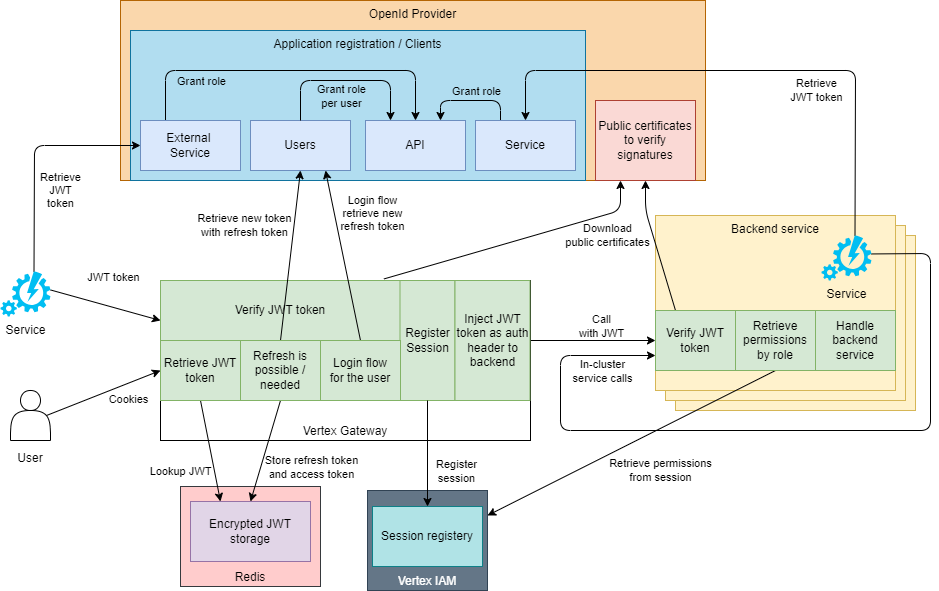
The high level overview of the authentication components in and out of the cluster. The OpenId component has 4 different registrations:
Because there are many permissions we generate a set of managed roles. These managed roles are a vision of what a role can be. These roles can be used as building blocks to fine-tune roles for a specific Vertex rollout. The managed roles can always be bypassed and fully custom roles can be defined if preferred or required.
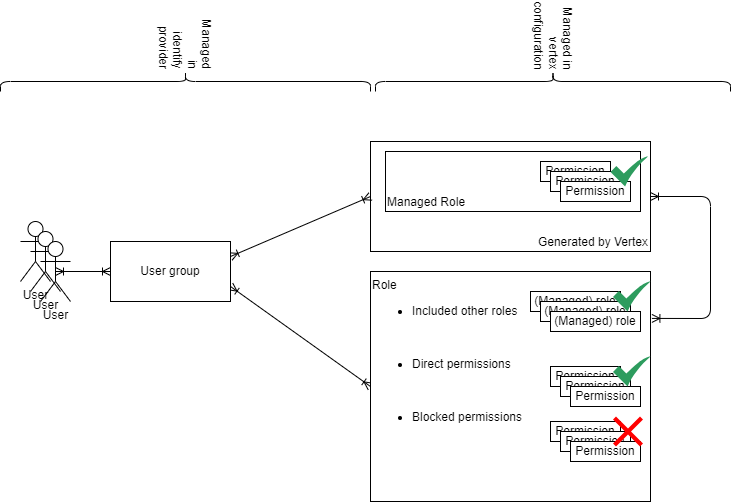
The assignment of roles is a crucial step in managing access to Vertex. This process is overseen by the OpenId provider of choice withing the company. Because of the trust relation with the OpenId provider all tools already in use in the company can be re-use for role management. There are 2 typical ways to manage roles for the users of Vertex:
If a role is revoked the next interaction with the OpenId provider (by new login or if a refresh token is used on the users behalf) will issue a new JWT token to use with the resources. This JWT token will have the update roles and the permissions will be automatically scoped to the roles that are available in the JWT token, effectively revoking the permissions with a managed time frame. The lifetime of the JWT tokens retrieved with the refresh token is configured on the OpenId provider itself, making sure that the lifetime of the token can be managed by the company.
Vertex authentication has been rebuilt to work with an OpenID provider, like Azure AD. The roles are defined in the OpenID provider and assigned to the user. After configuring the Vertex with a specific OpenID Provider, it will trust all tokens issued by this provider and will validate the JWT tokens against the public keys of this OpenID provider. The mapping between a Role and a specific permission is done in the application configuration that is provided through the Vertex GitOps repository. Vertex does track sessions as it encounters them in the JWT tokens and it will create an entry in its Identity Access Management module database so that changes done by this session can be linked to a specific user and session combination. This information is the basis of the audit mechanisms that are implemented in Vertex.
Our front-end UI does not contain any auth state because the browser has no inherent safe space to store a sensitive piece of data like a JWT token while also having the option to open new tabs or refreshing the page while still being logged in. Therefor we moved the state of authentication to the Vertex Gateway and with that the JWT refresh token and access token handling to the Gateway.
The Gateway will redirect the user on non-API routes to the OpenId providers login screen. Here the user can login using the credentials and methods that are supported / provided by the OpenId provider itself. Vertex has not control over the authentication that is preformed here and only on a successful authentication the OpenId provider will redirect the user back to the Vertex Gateway with a JWT refresh token. This refresh token can be used to retrieve actual access tokens on behalf of the user. All tokens that are retrieved and will be used are also send to the IAM module so the IAM module can get the details from this access JWT token to:
The APIs behind the gateway will use the bearer token to retrieve the user session details from Redis. This user session detail will contain the full list of permissions the user has rights to. If the user session is not (yet) available on Redis it will publish a PutUserSessionRequest message on redis that is picked up by the Vertex IAM module to be processed into the database and published on Redis. Once the session details appear on Redis it will read the details from the value and continue as normal. Given the list of permission the user has rights to in that session it can verify that the action the user is trying to do on the backend service is permitted by looking up the permission linked to that action in the list of permissions of the user.
Note: The Gateway needs a client secret from the OpenId provider to identify itself as an authorized application that is allowed to keep refresh tokens on behalf of the user. These refresh tokens with the client secret do not hold any permissions, as they would for a service account, it is to authorize the handling of refresh tokens on behalf of the use.
The Vertex IAM module is responsible for processing PutUserSessionRequest messages that are published on Redis. It will make sure that a session is only created once and that after processing the user session details will be published in a Redis key-value. All other modules will be monitoring the key of that session to await the user session details provided by the Vertex IAM module. The Vertex IAM module will assign the session id / AuthToken to the specific session and register all relevant user and session details in the database for later reference. The AuthToken will be tagged on all actions of the user to later link it back to a single user session of a specific user. This way we can always refer back to a specific session that a user had when a change is done somewhere in the Vertex system since everything that is event sourced, as well as all commands, will have the AuthToken stored on them.
The full flow of the interactions between the user or browser with the Gateway, backend service, OpenId provider, Redis service, Vertex IAM module can be seen in this diagram:
sequenceDiagram
    actor User
    participant Vertex Gateway
    participant OpenId Provider
    participant Backend service
    participant Encrypted Session Storage
    participant Redis
    participant Vertex IAM
    participant Vertex IAM DB
    participant Key Vault
    alt When startup of module
        Vertex Gateway->>+Key Vault: Request session encryption key
        Key Vault->>-Vertex Gateway: Send session encryption key
        Vertex Gateway->>Encrypted Session Storage: Initialize with session encryption key
        Encrypted Session Storage->>Redis:Storage generated protection keys
    end
    User->>+Vertex Gateway: Request
    alt has NO valid authorization cookie
        Vertex Gateway->>-User: Redirect to OpenId Provider
        User->>+OpenId Provider: Do authentication with OpenId Provider
        OpenId Provider->>-User: Redirect to gateway with refresh token
        User->>+Vertex Gateway: Refresh token from OpenId Provider
        Vertex Gateway->>Encrypted Session Storage: Store refresh token
        Encrypted Session Storage->>Redis: Store encrypted refresh token
    end
    Vertex Gateway->>+Encrypted Session Storage: Request access token
    Encrypted Session Storage->>+Redis: Request encrypted access token
    Redis->>-Encrypted Session Storage: Receive encrypted access token
    Encrypted Session Storage->>-Vertex Gateway: Receive access token
    Vertex Gateway->>Vertex Gateway: Decrypt to encrypted access token
    alt has NO valid access token
        Vertex Gateway->>+Encrypted Session Storage: Request refresh token
        Encrypted Session Storage->>+Redis: Request encrypted refresh token
        Redis->>-Encrypted Session Storage: Receive encrypted refresh token
        Encrypted Session Storage->>-Vertex Gateway: Receive refresh token
        Vertex Gateway->>Vertex Gateway: Decrypt to encrypted refresh token
        alt has valid refresh token
            Vertex Gateway->>+OpenId Provider: Request Access Token using the Refresh Token
            OpenId Provider->>-Vertex Gateway: Provide Access Token
            Backend service->>+Redis: Publish PutUserSessionRequest message
            Redis->>+Vertex IAM: Process PutUserSessionRequest message
            Vertex IAM->>+Vertex IAM DB: Check if user is known in the database
            alt user session is already known
                Vertex IAM DB->>Vertex IAM: User session details
            else user session was not yet known
                Vertex IAM->>+Vertex IAM DB: Create new user session
            end
            Vertex IAM->>-Redis: Publish User Session details
        end
    end
    Vertex Gateway->>+Backend service: Request with access JWT token
    Backend service->>+OpenId Provider: Get public key
    Backend service->>Backend service: Validate the JWT token signature with the public key
    alt signature is invalid
        Backend service->>Vertex Gateway: Unauthenticated response
        Vertex Gateway->>User: Unauthenticated response
    end
    Backend service->>+Redis: Get session details by session identifier
    Redis->>-Backend service: User session details or no details available message
    alt no user session details registered in Redis
        Backend service->>+Redis: Publish PutUserSessionRequest message
        Redis->>+Vertex IAM: Process PutUserSessionRequest message
        Vertex IAM->>+Vertex IAM DB: Check if user is known in the database
        alt user session is already known
            Vertex IAM DB->>Vertex IAM: User session details
        else user session was not yet known
            Vertex IAM->>+Vertex IAM DB: Create new user session
        end
        Vertex IAM->>-Redis: Publish User Session details
        Backend service->>+Redis: Get session details by session identifier
        Redis->>-Backend service: User session details or no details available message
    end
    alt user session details available
        Backend service->>Backend service: Verify that the session identifier and the roles provided in the user details match the authoritative data from the JWT token
    else (still) no user session details
        Backend service->>Vertex Gateway: Unauthenticated response
        Vertex Gateway->>User: Unauthenticated response
    end
    Backend service->>-Vertex Gateway: Successful response
    Vertex Gateway->>User: Succesfull response
To harden our supply chain we take a set of measures throughout the software development and delivery process:
Also see Software Bill of Materials (SBOM) and Vulnerabilities
We constantly use the latest base docker container image to run our software on. With every version of the software created the latest version of that base image, with the latest patches applied, will be used. By having a steady release pace, the base layer of the containers are kept at a up-to-date patch level.
A more practical description of observability can be found here
All logging of the applications in the cluster is collected in the OpenTelemetry collector. This tool can forward any logging to a security departments systems as long as they support the open standard of OpenTelemetry. The security tool can monitor the logs for suspicious behavior if required, can keep a copy of the logs for whatever period is needed and with the necessary protections against tampering, overwriting and unauthorized access.
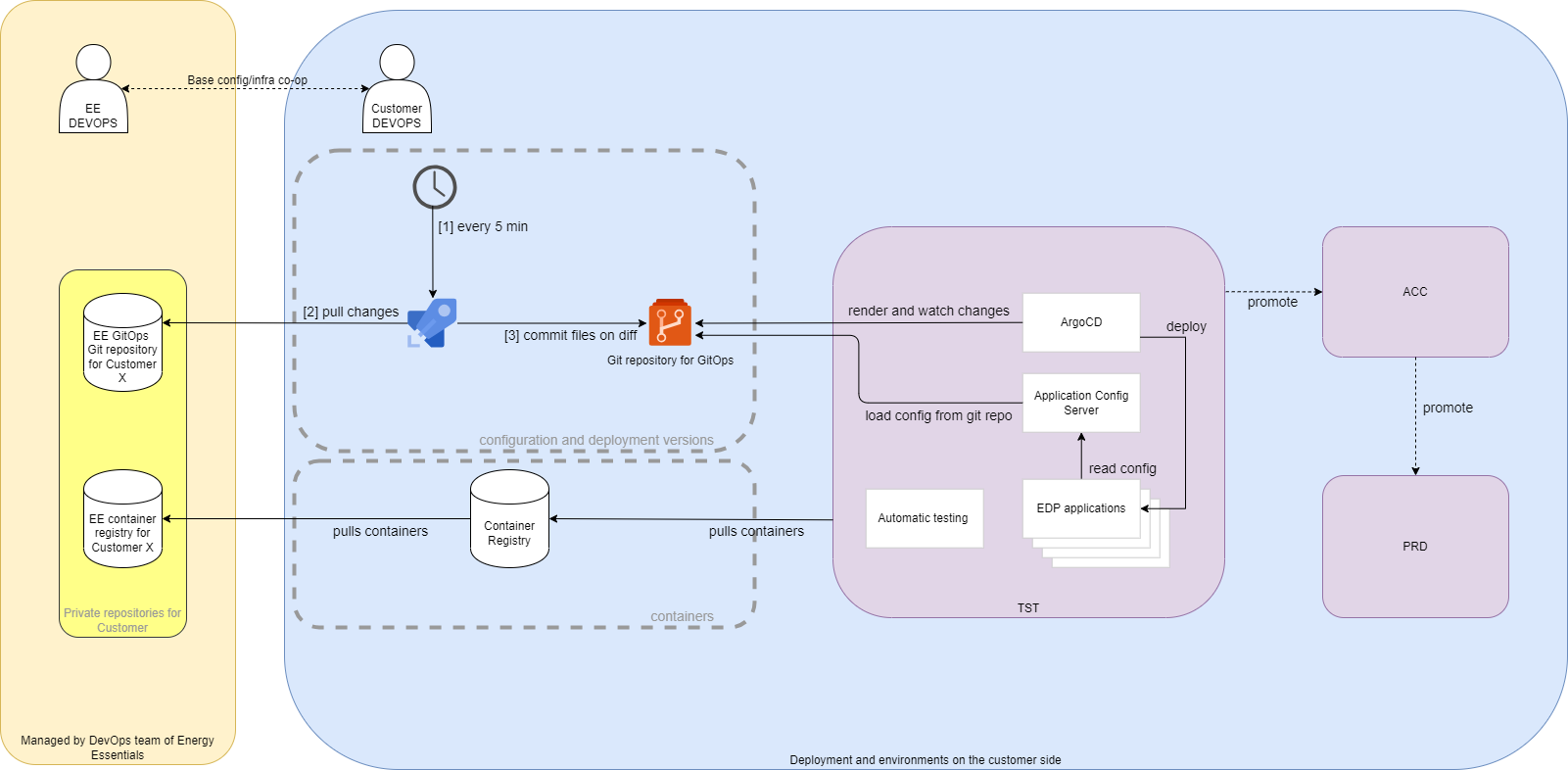
Argo CD is a Kubernetes controller, responsible for continuously monitoring all running applications and comparing their live state to the desired state specified in the Git repository. Process Overview
To streamline the deployment of the full Vertex application we have implemented sync waves. This orchestrates the order in which resources are applied by ArgoCD. We have the following waves:
This will deploy all operators that will handle custom resources that are deployed later
This will deploy all observability elements and the configuration service
This will deploy all shared commodity services like Kafka and Redis
Run the jobs that will initialize or upgrade the application components
Deploy the actual Vertex components that have a dependency on all previous waves
Docker container images are delivered through a container registry. This is an repository that is specially designed for delivering images. The container register is contains various versions of the software containers. The container registry is customer specific and contains all the images that are used in the customer environment.
GitOps is a way of implementing Continuous Deployment for cloud native applications. GitOps works by using Git as a single source of truth for declarative infrastructure and applications. An automated process synchronizes state between version control and the runtime environment.
There are roughly three steps to make this happen:
NB: Step 2 and 3 can (and will) be scripted with Terraform as well.
We have a bi-weekly sprint after which we always have a new release available. By using continuous integration we integrate the code of the developers frequently and minimize diverging paths of code. Running the automated tests will continuously check thousands of assumptions we have over our technical functionality and will catch code that alters one of those assumptions early in the process. Frequent releases to production makes sure that the amount of change per release is smaller and therefor the risk smaller. In the event that a problem does occur the recent changes are top of mind, easier to correct and easier to analyze because of less code has been changed.
The release pace is depicted in the table below:

Our software version naming convention aligns with our sprint cycle and is composed of the following elements:
Example: A version labeled 2024.1.0.345 indicates a release in 2024, during the first sprint, without patches, and is the 345th build.
Energy Essentials has built a pipeline (Azure Pipelines) for releasing software. It consists of the following steps.
An extensive release procedure can be found here
During the build the software is verified in different ways and numerous build artifacts are created and collected to be distributed alongside the software.
During the build we run our separated test projects that can test units, components and integrations between components of the software. Automated tests run during the build process help improve the quality of the software by decreasing bugs, validating features and are a crucial part of the feedback loop. Fast feedback to developers and validating the software in an automated fashion wil help increase the delivery speed of the software.
Unit tests target the smallest testable units of code, this could means individual methods or classes of the software. These tests validate the correctness of these units by examining their input, output, and internal behavior. Unit tests help identify bugs or issues within specific code segments and provide a foundation for code refactoring and maintenance.
Component tests focus on verifying the individual components or modules of the software in isolation. They test the behavior, functionality, and performance of each component independently.
Integration tests are designed to assess the interactions and compatibility between different components or modules of the software. These tests ensure that the integrated system functions as expected and that the individual components work harmoniously together. Integration tests often focus on testing interfaces, data flows, and communication between different parts of the software.
These test create a xml document with the results of the test during the build of a module.
During our build process, we generate a comprehensive Software Bill of Materials (SBOM). This document serves as a detailed inventory, listing all components and dependencies utilized in our software application. The SBOM is crucial for effective vulnerability management and can help with license compliance.
We deploy a few tools to generate a SBOM and do a vulnerability check
At build time, it is crucial to ensure that the software being developed has a minimal number of known vulnerabilities. This verification process helps minimize the risk associated with vulnerabilities and enhances the overall security of the software. By using the SBOM that we created in the build process the development teams can assess the components and dependencies used in the software and check for any known vulnerabilities associated with them. The goal is to identify and address these vulnerabilities early on, before the software is deployed. This proactive approach helps reduce the chances of introducing or propagating vulnerabilities throughout the development cycle, leading to a more secure and robust software product.
The information gathered from Swyft and Trivy is consolidated into a report. This report contains links to the sbom files for download and it includes a list of dependencies, licenses and possible vulnerabilities known at time of the build. It will also report if there was a fix available at time of the build.
All SQL migrations are generated from a code model defined in the code. We use a tool to create upgrade SQL scripts for each module. By executing these scripts, we can upgrade the database to the latest schema from any previous version. The scripts are idempotent, containing all upgrades from an empty database up to the latest version. They only run the necessary upgrades for a given database state to bring it to the latest schema.
The SQL scripts are now automatically generated during the build process and included in the modules technical documentation page. This provides an DBA to inspect the upgrade script and this makes them an integral part of our documentation. This approach allows for easy review and understanding of the database changes.
We have developed a component within the application container to manage database schema upgrades. This container uses the actual SQL scripts that have been pre-generated and are exactly the same as the scripts included in the documentation, ensuring deterministic and transparent upgrades. This method eliminates the need for a separate upgrade container and leverages our existing configuration and secrets integration, providing seamless runtime integration.
Additionally, we prepare and document downgrade scripts for each version, facilitating potential rollbacks. These downgrade scripts are generated for all migrations of the module, providing the necessary scripts for reverting to previous database states.
During the build we generate a lot of technical artifacts that are included in the documentation automatically by the CI pipeline. The documentation is picked from all modules that are deployed to an environment and is combined into a unique documentation for a given deployment, catered to the exact software components and versions of that deployment.
The documentation contains some technical build details that is injected directly from the CI, it contains technical documentation for the module and it contains functional documentation for the specific module.
The documentation is delivered in the form of a static website that is hosted along the software modules. This way the correct version of the documentation is always delivered along with the software.
Observability can play an important role in the operations security of a running Vertex application. For more details see Security documentation
Observability is crucial to understand the application/systems workings. It can be used for monitoring the active applications and pro-activity find bottlenecks during the operation of these applications and systems. Good observability has 4 elements:
OpenTelemetry is the mechanism by which application code is instrumented, to help make a system observable. It creates a unified collection protocol that many applications and component can commutate in. The OpenTelemetry collector is used to collect traces, logs and metrics from various sources. Our default is to export this data to a elastic instance for correlation and displaying, but the OpenTelemetry collector supports a wide range of applications it can export to. Data can be forked in the collector, meaning it can be delivered to our default elastic solution but to customer specific observability solutions as well. For a list of supported exporters see here.
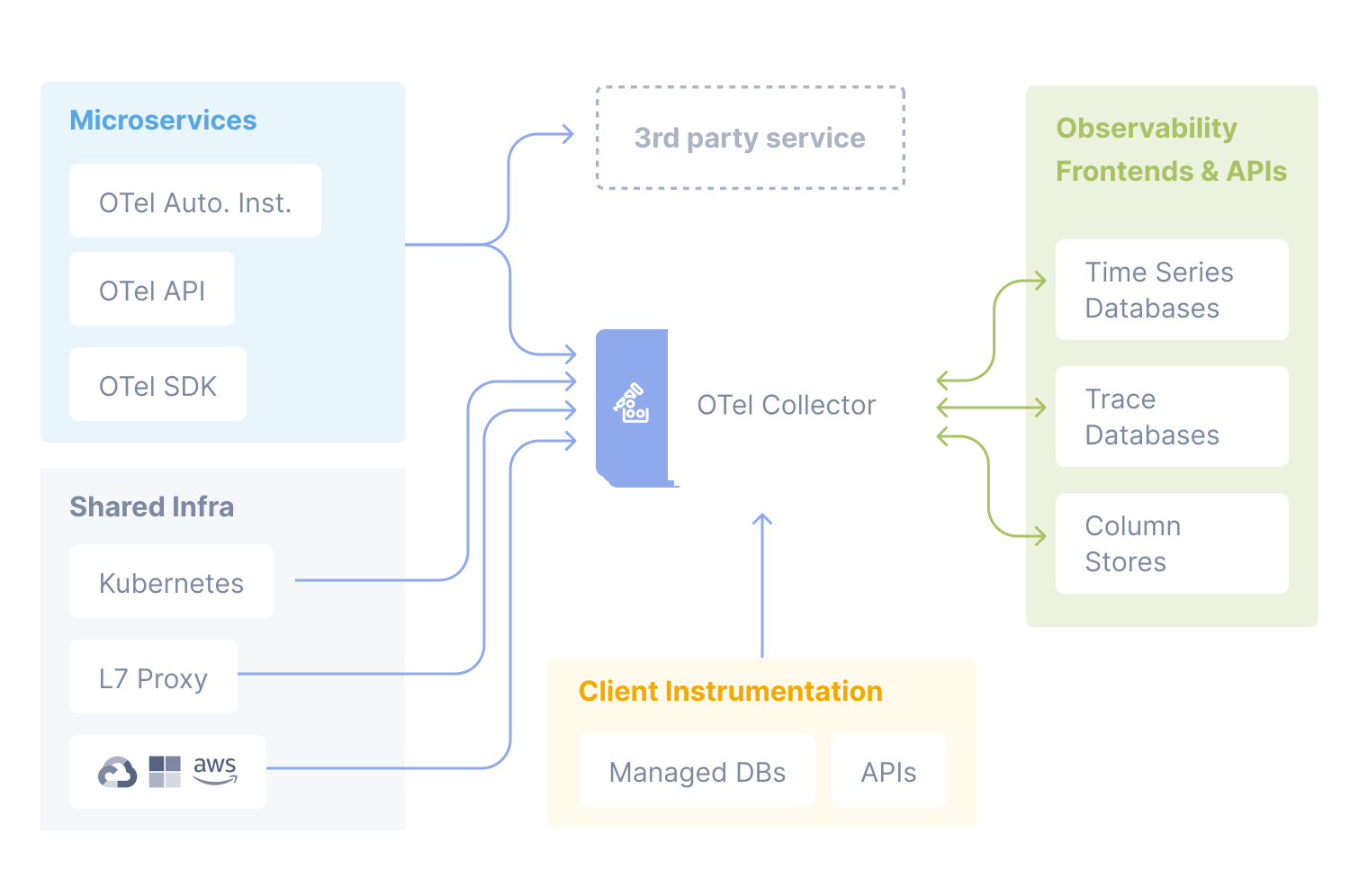
We use OpenTelemetry Collector to receive, process and export telemetry data. It removes the need to run, operate, and maintain multiple agents/collectors. It supports open source observability data formats (e.g. Jaeger, Prometheus, Fluent Bit, etc.) sending to one or more open source (or commercial) back-ends. In many cases, metric data can be scraped using Prometheus format. Most third-party applications have Prometheus exporters. We cannot always control the logs from systems, infrastructure or third-party components and enable a direct and structured shipping of these logs to our OpenTelemetry collector. In these cases, we read, pre-process and route logs using Fluent Bit, as depicted below.
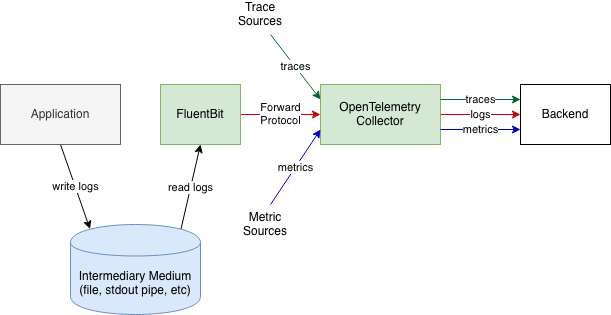
Logs from VERTEX applications can be sent directly to the collector, as depicted below.
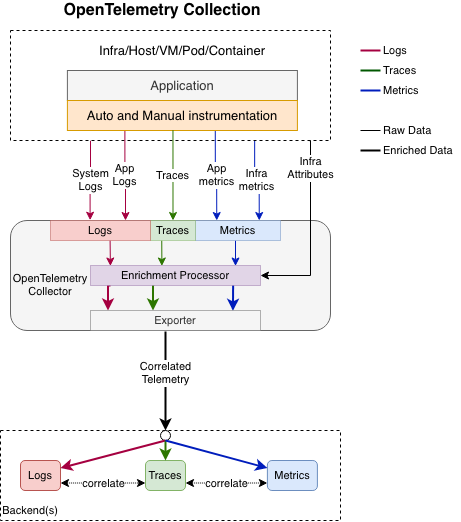
Logs can be correlated with the rest of observability data by the time of execution, by the execution context or by the origin of the telemetry. The OpenTelemetry Collector is configured such that it ships the logs to Elasticsearch. The APM Server receives data from OpenTelemetry Collector and transforms it into Elasticsearch documents. Visualization and alerting is done in Kibana and / or Checkmk.
For business process monitoring we have a home-brewed solution: the VERTEX Business Process Monitoring. Its purpose is to give insights into functional processes that don’t necessarily have technical linkage. It is not directly attached to any current tool but is approachable by all. This allows us to define business processes according to some configuration, add the steps we want to receive statuses on and additionally add timeouts and alerting. Time outs can be assigned based on time elapsed since last received steps, or datetime. Alerting can be set to send to multiple channels and based on certain statuses. Note: the technical process needs to send the statuses to this endpoint for the process to show the new statuses, this can be done through an API.
Most applications within the platform can be scaled up and down automatically based on load, horizontally (pods, nodes), with Horizontal Pod Autoscaling, which can use built-in metrics, Prometheus metrics, even predictive metrics to decide any change to the number of pods.
Vertex uses a set of different backends to store its state.
The object store is used for storing (large) unstructured data, referred to as objects. These objects can contain any kind of data, referred to as BLOBs (Binary Large Object).
The object store can be used for long term storage of data partitions, can be used to store messages and documents and can be used for storing and serving models.
Our current default read-model: because of high familiarity with most developers and BI departments Microsoft SQL Server is chosen as our default read model. The means that most of our domain state is projected into the SQL Server to be shown in screens or exposed to data tools of the customer.
A database that is more suitable for running in cluster or provides a lower costs PaaS solution for relational databases.
Apache Druid is an open-source, real-time analytics and OLAP (Online Analytical Processing) database. It serves as an important component for real-time data ingestion and analysis. This means that queries will include the very latest data.
Data can be ingested from various sources including the data streams that are provided by Vertex. Once ingested Druid helps with fast querying and exploration of large datasets. It can be used to do large scale calculations in a distributed performant way and it is a great datasource to provide the data for data driven dashboards.
Because Druid can also handle a lot of time series data it plays an essential role in data intensive components like portfolio management and analysis.
A datastore that is specifically design to handle lots of time series.
TimescaleDB is a time-series database extension for PostgreSQL. It’s designed for handling time-series data efficiently, making it suitable as a specialized time series store within Vertex. TimescaleDB offers advanced indexing and compression techniques, enabling high-performance data storage and retrieval for time-series data.
It can seamlessly scale vertically and horizontally to accommodate growing workloads. With features like automatic sharding and distributed hyper-tables, TimescaleDB efficiently distributes data across nodes or instances, ensuring optimal resource utilization and high availability. This scalability makes TimescaleDB well-suited for cloud-based applications that require flexible and efficient data handling.
Apache Kafka is a distributed streaming platform that’s used for building real-time data pipelines and streaming applications. It’s designed for high-throughput, fault-tolerant, and scalable data streaming, making it a good fit for use between the different components in the Vertex application.
Kafka is used to exchange events between the different components, it is used to give fire-and-forget / fire-once,consume-many pattern of events where event-driven asynchronous processes are created with a message on a Kafka Topic as the end of the responsibility of a process/service and a defined start point for a new process/service.
Kafka is also used in many enterprise integration patterns, where Vertex can have incoming and outgoing event-driven/asynchronous integrations with external applications/parties.
Because Kafka acts as a persisted ledger it can be used to store messages / events for a short period of time, meaning that producing an event and consuming an event can be split in time. This means that even when a component is not online or busy at a given point it can consume the event left by another service at a later point in time.
Redis is an open-source, in-memory data store and cache. It serves as a crucial component for high-speed data storage and retrieval. Redis is used by various components in the Vertex landscape to have a cluster-wide distributed key-value store for caching and storing live cluster state shared between components. Data in Redis is not intended for long term storage. A loss of data in Redis can be recovered by restarting Vertex.
All infrastructure (IaC) and the EDP solution stack is code on git. We can launch a new environment relatively quickly. This excludes data obviously. Our strategy to prevent disaster and to recover from disaster is: Azure Region Pair for disaster recovery purposes. If one of the regions were to experience a disaster or failure, then the services in that region will automatically failover to that regions’ secondary region in the pair. Minimizing downtime with High Availability. Backups: PostgreSQL (i.e. TimescaleDB) comes with the tools you need to perform backups, incremental/continuous backups, and do point-in-time-recovery from backups. Archiving WAL (Write Ahead Log) files is a fundamental operation that facilitates these features. We put these files in an object store. Apache Druid metadata store snapshotting, segments in an object store. Persist Kafka messages in an object store.
Vertex is an modular application that has integration between the modules and is open for integration by design.
We want to build and deliver software that is easy to maintain since this is better for all parties involved. However sometimes there are certain parts of the software where very specific behavior is requested by a customer that makes perfect sense for the business case / implementation that the customer is creating / running. Because we acknowledge that not everything can be captured in generic software we have opened our design to include a custom module.
A custom module is a module that runs along all the generic Vertex modules but implements customer specific logic. Most of the time this logic is created to integrate with other applications of the customer.
Examples of what could be build in custom module is a Pricing Value Provider that runs with every pricing and sends a specific subset of the pricing request, over a Kafka integration, to a service that is running in the customer landscape to get a risk index for that particular customer/pricing and continue the pricing calculation, with the risk index, one a response for this request is posted on another Kafka topic.
Plugins in the Vertex system are specific points in the application where we expect other services to add their own extensions to the basic functionalities. Examples of plugin systems within Vertex are: Pricing Value Providers, Document Types, Document Actions, Job Types. With these places for extensions other services can add their own specific logic to generic piece of logic. For example the TenneT module can implement a specific document type for the Nomination Message, this document type adds the feature to the Document Store module to identify TenneT nomination messages and once imported this same document type can extract metadata from that message so fields like the Sender, Receiver and MessageId can be extracted from the message and stored in the document metadata.
Everything that is done through the front-end of Vertex is done through an API call. This API is further documented in a Swagger documentation. This means that most things can be automated through the API right away. Next to the API methods we have to support the front-end we also have API methods specifically for integration with other applications.
There is also the option to add specific REST methods to the custom module so the customer can have a specific API that is more static over versions of the software. We will design an API that meets the needs of the customer and will transform / map this into our internal API calls we need to make to implemented the contract that has been agreed. This means that this specific API is more decoupled when the Vertex software evolves and not every change in every API needs to be followed by an integration team of the customer, making the integration more stable and pleasant to work with from both sides.
We lever the power of Apache Nifi for integration with all possible ETL flows. With NiFi we don’t need to code up a specific integration with all the different technology used by the parties we integrate with. This means that for Vertex we can standardize on a Kafka and REST interface. Interfacing with other types of applications like RabitMQ, Azure Storage Queues, Azure Blob Store, S3 buckets etc can all be implemented in a NiFi flow and mapped back to the standardized interfaces of Vertex.
In the very rare case that we need to integrate with a technology that is not supported by NiFi, the open-source character of Apache Nifi enables us to implement this data source ourselves.
This means that sending and retrieving data in an event-driven way is possible from almost every technique imaginable. Because the implementation of that technique is isolated to a specific processor in a NiFi flow our codebase is isolated from all these different techniques and we do not need to implement a lot of client software in the generic parts of Vertex.